Supporting non-majors in introductory computer courses
The article titled “Exploring Relations between Programming Learning Trajectories and Students’ Majors” https://dl.acm.org/doi/fullHtml/10.1145/3674399.3674497 investigates how students from various academic disciplines learn programming in a compulsory introductory programming course consisting of 75 students, with 40 majoring in CS and 35 in non-CS majors. “They were all freshmen without prior programming experience. Considering their similar scores of entrance exam to this university, it can be assumed that their levels of mathematical logic and computational thinking were roughly comparable”.
The authors note that “an increasing number of non-computer science students are now engaging in programming learning. However, they often struggle in early programming courses. The researchers analyzed data from students’ learning processes to understand how their major influences their learning journey in programming.
The study found that students’ backgrounds and areas of study can affect how they approach and progress in learning programming. They suggest:
Making Programming Relevant: When teaching programming to students who aren’t majoring in computer science, it’s important to connect the lessons to things that are important to them. For example, showing how programming can be used in art, music, or business can make the subject more interesting, especially at the start of the course.
Paying Extra Attention to Struggling Students: Teachers should keep a close eye on students who are not doing well or aren’t very interested in the course. These students might need extra help to keep up, so they don’t fall behind. Connecting them with teaching assistants, Luddy tutors, and additional resources early in the semester could be helpful.
Using Tests to Track Progress: For computer science students, instructors can use quizzes and smaller tests throughout the semester to see how well they’re doing. This helps faculty know if they’re learning. However, for non-CS students who are doing well, these smaller tests might not show their full abilities, so the teacher needs to be extra careful when evaluating their skills. These students might be good at memorizing facts or completing basic tasks in the test, but that doesn’t mean they fully grasp the deeper concepts or could apply the knowledge in real-world situations. So, instructors need to be extra thoughtful and consider other ways to evaluate their skills, not just based on these smaller tests.
Example:
Imagine a student in a business major who is acing the quizzes in a programming class. They might be good at solving problems that are simple and similar to what they’ve studied, but the quizzes might not show how well they can use programming to solve real business problems. Faculty might need to look at other work, like projects or group activities, to better understand the student’s true abilities.
Implications for Teaching and Learning:
Tailored Instruction: Educators can design programming courses that consider the diverse backgrounds of students, offering different learning paths or support based on their major.Example: In a programming class, students from a data science major might already have some knowledge of coding, so the instructor could offer them more advanced challenges while giving students from a humanities background more basic programming tasks. This ensures that all students are working at a level that matches their prior knowledge, making learning more effective.
Early Support: Providing additional resources or guidance early in the course can help students who might struggle due to their major’s focus, ensuring they keep up with the material.Example: In the first few weeks of a programming course, an instructor might offer extra study sessions or online tutorials for students from non-technical majors (like business or social sciences). These students may find programming challenging, so additional support would help them catch up and build their confidence early in the course.
Encouraging Diverse Majors: Encouraging students from various disciplines to engage with programming can enrich their learning experience and broaden their skill set.Example: A university might organize workshops to show students from creative fields (like art or design) how programming can help them bring their ideas to life, such as creating interactive websites or digital art. Encouraging students from these fields to explore programming opens new possibilities for their careers and learning.
By understanding the relationship between a student’s major and their programming learning trajectory, educators can create more effective and supportive learning environments.
“A Map Makes You Smarter. GPS Does Not.”: A Story About AI, Work, and What Comes Next with Jose Antonio Bowen
Jose Antonio Bowen is introduced as a Renaissance thinker with a jazz soul. His background includes leadership roles at Stanford, Georgetown, and SMU, as well as being the president of Johnstreet College. He is also a jazz musician who has played with legends, a composer with a Pulitzer-nominated symphony, and the author of “Teaching Naked,” 30% off with the code TNT30 at Wiley “Teaching Change,” and “Teaching with AI.” 30% off Teaching Change or Teaching with AI with Code HTWN at JH.
He provided a workshop for us on AI Assignment and Assessments, where he mentioned:
“A map makes you smarter. GPS does not.”
It was such a small, quiet moment, but it cracked open something bigger. Because this wasn’t just about directions. It was about how we’re all starting to think less, remember less, and—if we’re not careful—become less, all thanks to the technology we depend on.
The Decline of Entry-Level Everything
Dr. Bowen shared that Shell, a global energy giant, had laid off nearly 38% of a particular workforce group. Internships? Vanishing. Entry-level jobs? Replaced.
Replaced by what?
Artificial Intelligence
Tasks that used to belong to interns or fresh graduates—writing reports, creating slide decks, analyzing data—are now handled by machines that don’t take lunch breaks or need supervision.
And that’s where the real twist came in: the people who still have jobs? They’re not the ones who can do the task better than AI. They’re the ones who can think better than AI. Who can improve, refine, and oversee what AI produces.
If AI is writing the first draft, the humans left in the room better know how to write the final one—with nuance, clarity, and insight.
Offloading Our Minds, One Task at a Time
Back to that GPS quote. Dr. Bowen called it “cognitive offloading”—how we gradually stop using certain mental muscles because tech is doing the lifting.
We used to memorize phone numbers, navigate with paper maps, even mentally calculate tips at restaurants. Now? We ask Siri.
The scary part isn’t that we’re forgetting how to do these things. It’s what happens when we offload creativity, problem-solving, and thinking itself.
Because if AI can be creative—can write poems, code apps, design marketing plans—what do we do? What’s left for us?
Creativity, Reimagined
But here’s where things got interesting. Dr. Bowen isn’t anti-AI. In fact, he practically gushed about it.
He showed how AI can be used to spark creativity, not stifle it.
He explained how students could upload a 700-page textbook and have the AI turn it into a podcast. A nine-minute podcast. With baseball analogies, if that’s what helps them learn.
He talked about using AI to create personalized assignments: instead of a generic math problem about trains, give a politics student a question about voter turnout rates. Suddenly, they care. Suddenly, they’re engaged.
Because AI isn’t replacing the teacher—it’s becoming the chalk, the blackboard, the entire toolset that a smart educator can use to make learning come alive.
Prompt Like a Pro
Here’s another nugget that stuck with me: prompting isn’t coding. It’s storytelling.
Don’t just ask the AI to “fix your proposal.” Ask it to “transform your proposal into something your provost will love.”
Use emotion. Use intent. Give context. AI, it turns out, responds best when it knows what you’re really trying to say.
The 70% Problem
Still, AI isn’t perfect. Dr. Bowen introduced what he called the “70% problem.”
AI can do a lot of things—but only up to a C-level standard. That’s fine for a rough draft. It’s dangerous for a final product.
If students rely on AI to do the work, and they can’t take it past that 70% mark, then what happens when employers expect more?
The solution? Raise the bar.
What used to be acceptable for a B or C should now earn an F—unless the student can make the AI’s work better, smarter, more human.
From Tools to Teaching Assistants
The future of education, the he argued, is not about banning AI—it’s about designing with it.
He showed how teaching assistants could use AI notebooks filled with chemistry texts to answer student questions on the fly.
How AI can test business plans, simulate presidential decisions, or offer critiques from the perspective of a political opponent.
How students can train AI to “be” Einstein and ask it about thermodynamics at their own pace, in their own language.
AI isn’t replacing teachers—it’s becoming part of the classroom, like textbooks once were.
The Arms Race
Of course, there’s a darker side. AI can cheat. It can take online courses for students, fake typing patterns, even simulate human error.
Dr. Bowen called it an “arms race” between those building smarter AI and those trying to prevent it from being misused.
But even in this, he saw hope.
If educators embrace AI—not as an enemy but as a creative partner—they can design assignments AI can’t complete alone. They can build simulations, storytelling challenges, and editing tasks that require a human mind.
Because at the end of the day, that’s what this moment demands: humans who think more deeply, ask better questions, and create things worth remembering.
Final Words
The session ended with a simple truth:
“AI raises the floor. You must raise the ceiling.”
Whether you’re a student, a teacher, a manager, or a job-seeker, AI is now the baseline.
It will write the first draft, sketch the first idea, solve the first problem.
But it’s still up to us to bring the brilliance.
AI can produce work at a “C” level, which is problematic if students can only perform at that level. Instructors need to raise their standards and expectations. Assignments that would have been considered a “C” should now be evaluated as an “F” if they only meet the level of quality that AI can produce.
Implications
Students need to surpass AI capabilities to be competitive in the job market, especially in fields like coding and writing.
And maybe—just maybe—it’s time we all learned to read the map again.
Course Mapping Templates
A few weeks ago, I shared some resources that included an interactive site which allowed you to plan out each lesson or module of your course. The information below can be used to help you to map out your course. Couse Mapping is an excellent approach to designing or redesigning a course. The Course Mapping Guide linked below allows you to complete a curriculum analysis of your course which results in a course map that displays the alignment of all components of a course. If you view the example on their site of the Java Programming class, you are able to see how each of the course outcomes are addressed through the modules of the course. You can also understand how the assessments and rubrics, learner interactions and engagements, as well as the instructional materials support the learning outcomes for each module: https://www.coursemapguide.com/mapping-your-course
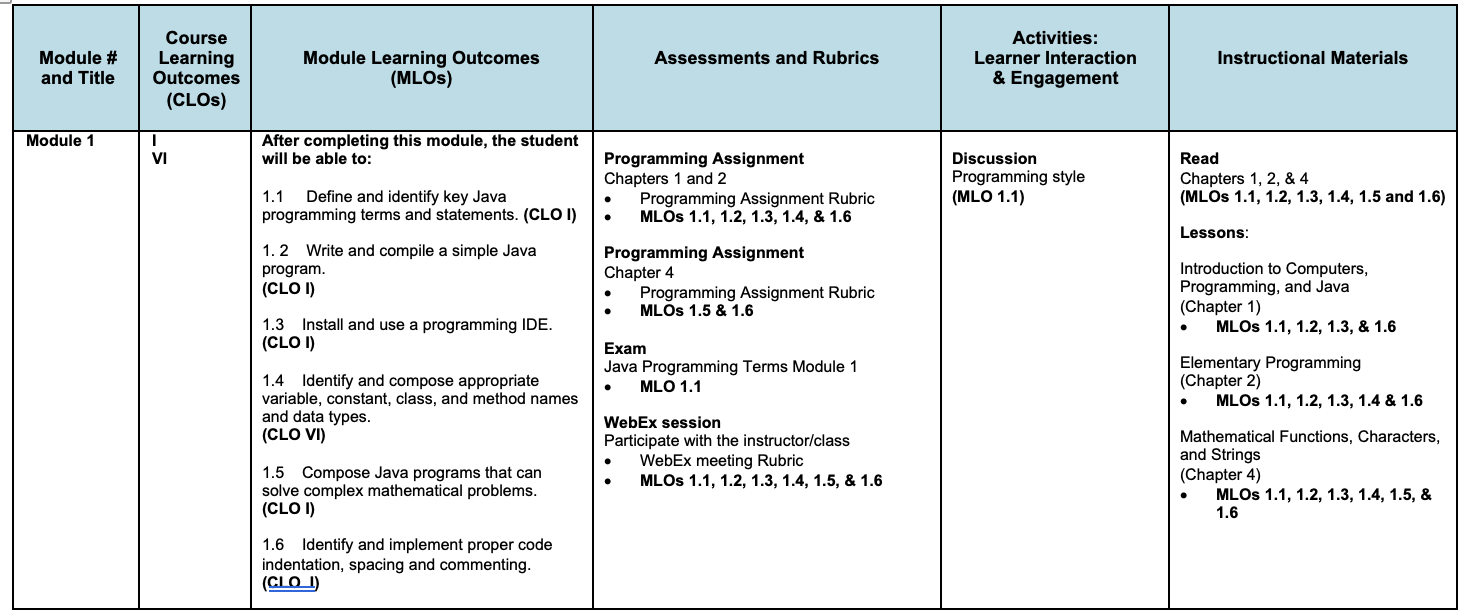
Screen shot of course map at the modular level.
Quality Matters provides a similar tool that includes a Learning Objectives Activity. This activity helps you to ensure that your learning objectives are S.M.A.R.T.:
Specific, Measurable, Achievable, Relevant, and Time Bound. https://www.qualitymatters.org/sites/default/files/presentations/MapYourWayToAQualityCourse_HandoutLOs_ApodacaForsythe.pdf For more information see: https://www.qualitymatters.org/qa-resources/resource-center/conference-presentations/map-your-way-quality-course-course-mapping
A few more template examples can be found here:
https://nmsu.instructure.com/courses/949381/assignments/3676931
Teaching.Tools and the Active Learning Library
The Teaching.Tools Website has a few resources that may be helpful to you.
The Active Learning Library https://teaching.tools/activities allows you to explore teaching strategies aimed to increase engagement in the classroom. This site allows you to search for activities by filtering based on:
Difficulty (for the instructor)
Prep Time Required
Bloom’s Taxonomy (e.g., remember, apply)
Active Learning (e.g., individual engagement, small group engagement)
Inclusive Learning (e.g., gives students choices, emphasizes the relevance or value of the material)
Whole-Person Learning (e.g., emphasizes student values and emotions, emphasizes metacognitive skills)
Formative Feedback
Activity Time
Class Size
Class Modality
The Pedagogical Reading List https://teaching.tools/resources is comprised of a community-generated database of resources for college teaching around topics including Accessibility and UDL
Active Learning
Assessment
Curriculum
Diversity, Equity, Inclusion
Education Research
Educational Technology
Experiential Learning
Graduate Students
Learning Analytics
Mental Health
Online Teaching
Problem/Project-Based Learning
Race and Anti-Racism
STEM
Science of Learning
While the Lesson Planning Tool https://teaching.tools/lessonplanner provides an interactive template for creating college-level class sessions. You can use the tool without an account. You must sign in to save your lesson. Accounts are free.

Pre-Course Survey
One way to improve engagement with your students is to learn more about them. A precourse survey is one way to help develop a connection with your students, and get to know them beyond what is shared in an introduction discussion.
What do you want to know about them?
Diligent student in college with classmates, taking notes of teacher lecture.
A survey can help you conduct a needs assessment about where your students are at in terms of prior knowledge, demographics, mindset, learning preferences, goals, content confidence level, preferred feedback style, and/or access to technology. Because this takes place “behind the scenes” and is only shared with the instructor, rather than in a public discussion forum, you may be more likely to receive candid responses.
What strategies and skills will students need and/or develop in your course?
These kinds of questions can help students flex metacognitive skills and become more aware of their learning habits. As an instructor, this can help you provide more specific feedback on student work, suggesting similar strategies and stretch goals.
Reflection on Strategies: Metacognitive reflection questions ask how students get things done. Do you take marginal notes or highlight as you read? What conditions do you need to do your best work?
Planning Ahead: Beyond what has worked for students in the past, you might ask about strategies they will use specifically in this class. What times each week do you have earmarked to work on this course?
Setting Goals:You might ask them to review the learning objectives, asking what they will commit to accomplishing. And beyond the learning objectives for the course, are there other skills or competencies they plan to work on in the course? Do they have any suggestions for the instructor about strategies for helping meet those goals?
During the first week of your course
Providing students with an opportunity to quiz themselves not on the course topic but on the course itself–how to get started in the course, how to navigate the course, what the course should help students accomplish, and how the course is structured–can help instructors send fewer emails saying, “It’s in the syllabus!”
Given multiple choice or true/false question types, these kinds of pre-course surveys can be automatically scored. Don’t forget to compose feedback for incorrect responses and allow multiple attempts!
What tools are available?
IU supports the Qualtrics survey tool and Canvas includes a dashboard feature that allows instructors to create a type of quiz called ‘ungraded’ that can be used as a survey. In Canvas, once the survey, or ‘ungraded quiz,’ is published online, students can login to their Canvas course page and participate. IU also has access to Google Forms and Microsoft Teams (Microsoft Forms are Available in the Channel and Chat features) for quick survey and quiz creation.
If you’d like support implementing a pre-course survey or questionnaire in your online class, or in any other aspects of teaching and learning, please contact me at your earliest convenience with your availability.