Supporting non-majors in introductory computer courses

The article titled “Exploring Relations between Programming Learning Trajectories and Students’ Majors” https://dl.acm.org/doi/fullHtml/10.1145/3674399.3674497 investigates how students from various academic disciplines learn programming in a compulsory introductory programming course consisting of 75 students, with 40 majoring in CS and 35 in non-CS majors. “They were all freshmen without prior programming experience. Considering their similar scores of entrance exam to this university, it can be assumed that their levels of mathematical logic and computational thinking were roughly comparable”.

The authors note that “an increasing number of non-computer science students are now engaging in programming learning. However, they often struggle in early programming courses. The researchers analyzed data from students’ learning processes to understand how their major influences their learning journey in programming.

The study found that students’ backgrounds and areas of study can affect how they approach and progress in learning programming. They suggest:

  1. Making Programming Relevant: When teaching programming to students who aren’t majoring in computer science, it’s important to connect the lessons to things that are important to them. For example, showing how programming can be used in art, music, or business can make the subject more interesting, especially at the start of the course.

  2. Paying Extra Attention to Struggling Students: Teachers should keep a close eye on students who are not doing well or aren’t very interested in the course. These students might need extra help to keep up, so they don’t fall behind. Connecting them with teaching assistants, Luddy tutors, and additional resources early in the semester could be helpful.

  3. Using Tests to Track Progress: For computer science students, instructors can use quizzes and smaller tests throughout the semester to see how well they’re doing. This helps faculty know if they’re learning. However, for non-CS students who are doing well, these smaller tests might not show their full abilities, so the teacher needs to be extra careful when evaluating their skills. These students might be good at memorizing facts or completing basic tasks in the test, but that doesn’t mean they fully grasp the deeper concepts or could apply the knowledge in real-world situations. So, instructors need to be extra thoughtful and consider other ways to evaluate their skills, not just based on these smaller tests.

Example:

Imagine a student in a business major who is acing the quizzes in a programming class. They might be good at solving problems that are simple and similar to what they’ve studied, but the quizzes might not show how well they can use programming to solve real business problems. Faculty might need to look at other work, like projects or group activities, to better understand the student’s true abilities.

Implications for Teaching and Learning:

  • Tailored Instruction: Educators can design programming courses that consider the diverse backgrounds of students, offering different learning paths or support based on their major.Example: In a programming class, students from a data science major might already have some knowledge of coding, so the instructor could offer them more advanced challenges while giving students from a humanities background more basic programming tasks. This ensures that all students are working at a level that matches their prior knowledge, making learning more effective.

  • Early Support: Providing additional resources or guidance early in the course can help students who might struggle due to their major’s focus, ensuring they keep up with the material.Example: In the first few weeks of a programming course, an instructor might offer extra study sessions or online tutorials for students from non-technical majors (like business or social sciences). These students may find programming challenging, so additional support would help them catch up and build their confidence early in the course.

  • Encouraging Diverse Majors: Encouraging students from various disciplines to engage with programming can enrich their learning experience and broaden their skill set.Example: A university might organize workshops to show students from creative fields (like art or design) how programming can help them bring their ideas to life, such as creating interactive websites or digital art. Encouraging students from these fields to explore programming opens new possibilities for their careers and learning.

By understanding the relationship between a student’s major and their programming learning trajectory, educators can create more effective and supportive learning environments.
“A Map Makes You Smarter. GPS Does Not.”: A Story About AI, Work, and What Comes Next with Jose Antonio Bowen

Jose Antonio Bowen is introduced as a Renaissance thinker with a jazz soul. His background includes leadership roles at Stanford, Georgetown, and SMU, as well as being the president of Johnstreet College. He is also a jazz musician who has played with legends, a composer with a Pulitzer-nominated symphony, and the author of “Teaching Naked,” 30% off with the code TNT30 at Wiley “Teaching Change,” and “Teaching with AI.” 30% off Teaching Change or Teaching with AI with Code HTWN at JH.

He provided a workshop for us on AI Assignment and Assessments, where he mentioned:

“A map makes you smarter. GPS does not.”

It was such a small, quiet moment, but it cracked open something bigger. Because this wasn’t just about directions. It was about how we’re all starting to think less, remember less, and—if we’re not careful—become less, all thanks to the technology we depend on.

The Decline of Entry-Level Everything

Dr. Bowen shared that Shell, a global energy giant, had laid off nearly 38% of a particular workforce group. Internships? Vanishing. Entry-level jobs? Replaced.

Replaced by what?

Artificial Intelligence

Tasks that used to belong to interns or fresh graduates—writing reports, creating slide decks, analyzing data—are now handled by machines that don’t take lunch breaks or need supervision.

And that’s where the real twist came in: the people who still have jobs? They’re not the ones who can do the task better than AI. They’re the ones who can think better than AI. Who can improve, refine, and oversee what AI produces.

If AI is writing the first draft, the humans left in the room better know how to write the final one—with nuance, clarity, and insight.

Offloading Our Minds, One Task at a Time

Back to that GPS quote. Dr. Bowen called it “cognitive offloading”—how we gradually stop using certain mental muscles because tech is doing the lifting.

We used to memorize phone numbers, navigate with paper maps, even mentally calculate tips at restaurants. Now? We ask Siri.

The scary part isn’t that we’re forgetting how to do these things. It’s what happens when we offload creativity, problem-solving, and thinking itself.

Because if AI can be creative—can write poems, code apps, design marketing plans—what do we do? What’s left for us?

Creativity, Reimagined

But here’s where things got interesting. Dr. Bowen isn’t anti-AI. In fact, he practically gushed about it.

He showed how AI can be used to spark creativity, not stifle it.

He explained how students could upload a 700-page textbook and have the AI turn it into a podcast. A nine-minute podcast. With baseball analogies, if that’s what helps them learn.

He talked about using AI to create personalized assignments: instead of a generic math problem about trains, give a politics student a question about voter turnout rates. Suddenly, they care. Suddenly, they’re engaged.

Because AI isn’t replacing the teacher—it’s becoming the chalk, the blackboard, the entire toolset that a smart educator can use to make learning come alive.

Prompt Like a Pro

Here’s another nugget that stuck with me: prompting isn’t coding. It’s storytelling.

Don’t just ask the AI to “fix your proposal.” Ask it to “transform your proposal into something your provost will love.”

Use emotion. Use intent. Give context. AI, it turns out, responds best when it knows what you’re really trying to say.

The 70% Problem

Still, AI isn’t perfect. Dr. Bowen introduced what he called the “70% problem.”

AI can do a lot of things—but only up to a C-level standard. That’s fine for a rough draft. It’s dangerous for a final product.

If students rely on AI to do the work, and they can’t take it past that 70% mark, then what happens when employers expect more?

The solution? Raise the bar.

What used to be acceptable for a B or C should now earn an F—unless the student can make the AI’s work better, smarter, more human.

From Tools to Teaching Assistants

The future of education, the he argued, is not about banning AI—it’s about designing with it.

He showed how teaching assistants could use AI notebooks filled with chemistry texts to answer student questions on the fly.
How AI can test business plans, simulate presidential decisions, or offer critiques from the perspective of a political opponent.
How students can train AI to “be” Einstein and ask it about thermodynamics at their own pace, in their own language.

AI isn’t replacing teachers—it’s becoming part of the classroom, like textbooks once were.

The Arms Race

Of course, there’s a darker side. AI can cheat. It can take online courses for students, fake typing patterns, even simulate human error.

Dr. Bowen called it an “arms race” between those building smarter AI and those trying to prevent it from being misused.

But even in this, he saw hope.

If educators embrace AI—not as an enemy but as a creative partner—they can design assignments AI can’t complete alone. They can build simulations, storytelling challenges, and editing tasks that require a human mind.

Because at the end of the day, that’s what this moment demands: humans who think more deeply, ask better questions, and create things worth remembering.

Final Words

The session ended with a simple truth:

“AI raises the floor. You must raise the ceiling.”

Whether you’re a student, a teacher, a manager, or a job-seeker, AI is now the baseline.

It will write the first draft, sketch the first idea, solve the first problem.

But it’s still up to us to bring the brilliance.

AI can produce work at a “C” level, which is problematic if students can only perform at that level. Instructors need to raise their standards and expectations. Assignments that would have been considered a “C” should now be evaluated as an “F” if they only meet the level of quality that AI can produce.

Implications

Students need to surpass AI capabilities to be competitive in the job market, especially in fields like coding and writing.

And maybe—just maybe—it’s time we all learned to read the map again.

Bridging the Gap: What Tech Practitioners Really Want from Computer Science Education

In the spring of 2024, the Computing Research Association (CRA) asked a simple but powerful question: What do industry professionals think about the way we teach computer science today?  as part of a “Practitioner to Professor (P2P)‘ survey that the CRA-Education / CRA-Industry working group is doing.

The response was overwhelming. More than 1,000 experienced computing practitioners—most with over two decades of experience—shared their honest thoughts on how well today’s CS graduates are being prepared for the real world.

These weren’t just any professionals. Over three-quarters work in software development. Many manage technical teams. Most hold degrees in computer science, with Bachelor’s and Master’s being the most common. Half work for large companies, and a majority are employed by organizations at the heart of computing innovation.

So, what did they say?

The Call for More—and Better—Coursework

One of the loudest messages was clear: students need more coursework in core computer science subjects. Respondents recommended about four additional CS courses beyond what’s typical today. Algorithms, computer architecture, and theoretical foundations topped the list.

But it wasn’t just CS classes that practitioners wanted more of. They also suggested expanding foundational courses—especially in math, writing, and systems thinking. It turns out that the ability to write clearly, think statistically, and understand how complex systems interact is as critical as knowing how to code.

It’s Not Just About Programming

When it came to programming languages, the responses painted a nuanced picture. Practitioners agreed: learning to code isn’t the end goal—learning to think like a problem-solver is.

They valued depth over breadth. Knowing one language well was seen as more important than dabbling in many. But they also stressed the importance of being adaptable—able to pick up new languages independently and comfortable working with different paradigms.

Familiarity with object-oriented programming? Definitely a plus. But what mattered most was a student’s ability to approach problems critically, apply logic, and build solutions—regardless of the language.

The Soft Skills Shortfall

One of the most striking critiques was aimed not at technical training, but at the lack of soft skills being taught in undergraduate programs.

Soft skills, they argued, can be taught—but many universities simply aren’t doing it well. Oral communication courses were highlighted as a critical need. And interestingly, several respondents felt that liberal arts programs were doing a better job than engineering-focused ones in nurturing communication, collaboration, and leadership.

Asked to identify the most important communication skills, respondents pointed to the ability to speak confidently in small technical groups, write solid technical documentation, and explain ideas clearly to leaders and clients—both technical and non-technical.

Math Is Still a Must

Despite the rise of high-level frameworks and automation, the industry’s love affair with math is far from over. In fact, 65% of respondents said they enjoyed or pursued more math than their degree required.

Why? Because math is the backbone of emerging fields like AI, machine learning, and data science. It sharpens analytical thinking, cultivates discipline, and builds a foundation for lifelong adaptability.

The most important math subjects? Statistics topped the list, followed by linear algebra, discrete math, calculus, and logic.

Foundations First

The survey didn’t just surface high-level trends—it got specific.

In algorithms, the emphasis was on conceptual thinking, not just implementation. Students should deeply understand how algorithms work, why they matter, and how to analyze them.

In computer architecture, digital logic and memory hierarchy were considered essential. These are the building blocks that enable students to understand modern computing systems, from the ground up.

And when it came to databases? Practitioners wanted a balance: students should learn both the theory (like relational algebra and normalization) and the practice (like SQL and indexing). Real-world readiness depends on both.

Toward a Better Future for CS Education

What makes this survey so impactful is its timing and intent. As technology continues to reshape every industry, there’s a growing urgency to close the gap between academia and the workforce. The P2P Survey is part of a broader movement to do just that.

Endorsed by leading organizations—ABET, ACM, CSAB, and IEEE-CS—this initiative creates a powerful feedback loop between universities and the industry they serve.

So, what’s next? A full report is expected later this year. But the message is already loud and clear: today’s students need a curriculum that not only teaches them how to code, but prepares them to lead, adapt, and thrive in a complex, evolving world.

Midterm Feedback via Google Illuminate | GenAI Essentials | Upcoming Opportunities

It’s a great time to think about receiving midsemester feedback on your course. I have written about the topics in the past on my blog, however, this time I used a new resource that might be helpful for multiple purposes:

Google Illuminate is an AI tool that creates podcast-style audio summaries of research papers. It’s designed to make complex academic information more accessible and engaging.

How it works

  1. Input a research paper, PDF, orURL into Illuminate*, or search for a topic.

  2. Illuminate generates an audio summary that explains the key points of the document.

  3. You can ask questions about the document, and Illuminate will provide a text output.

  4. You can convert the text output into a podcast answer.

*I do NOT recommend inputting copywritten information into this tool. However, it is optimized for computer science topics, and supports research papers hosted on arXiv.org

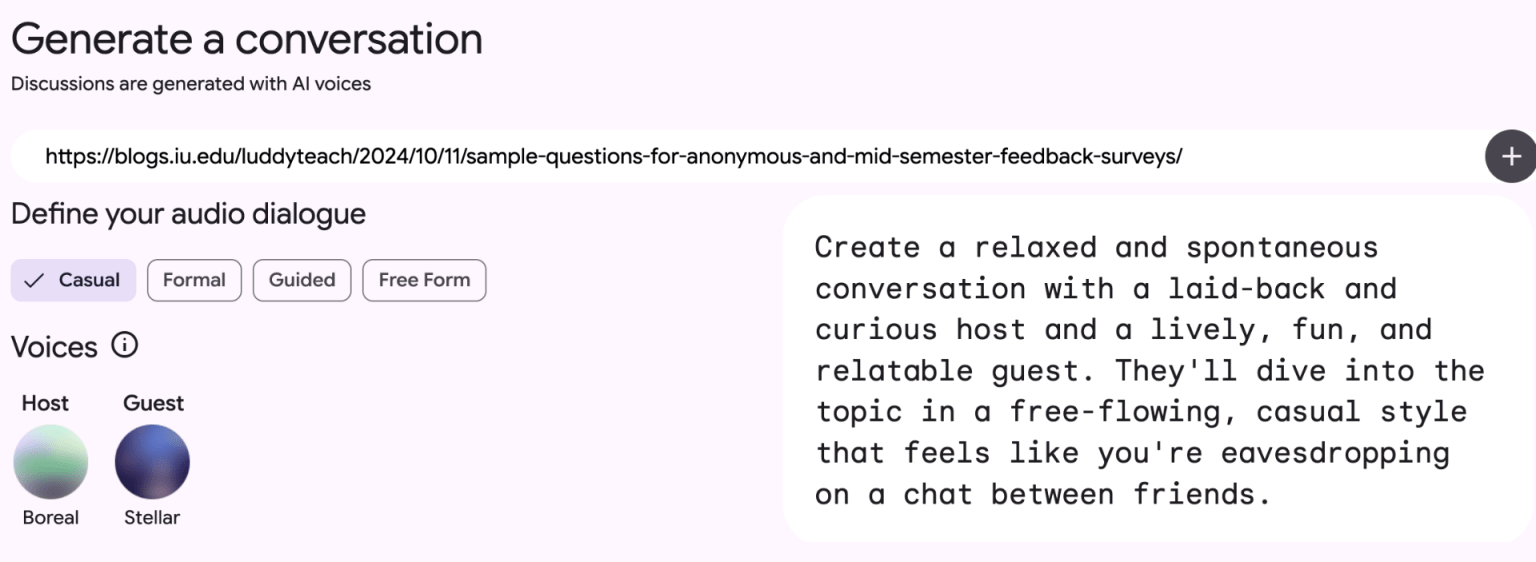
I used some of my previous blog posts to create a podcast that cover several aspects of creating developing and analyzing mid-semester feedback using the following prompt:

Create a relaxed and spontaneous conversation with a laid-back and curious host and a lively, fun, and relatable guest. They’ll dive into the topic in a free-flowing, casual style that feels like you’re eavesdropping on a chat between friends.

I used 4 resources from my blog:

Screenshot of what is now Google Notebook that shows a prompt for picking an audio for a podcast generated from my blog posts.

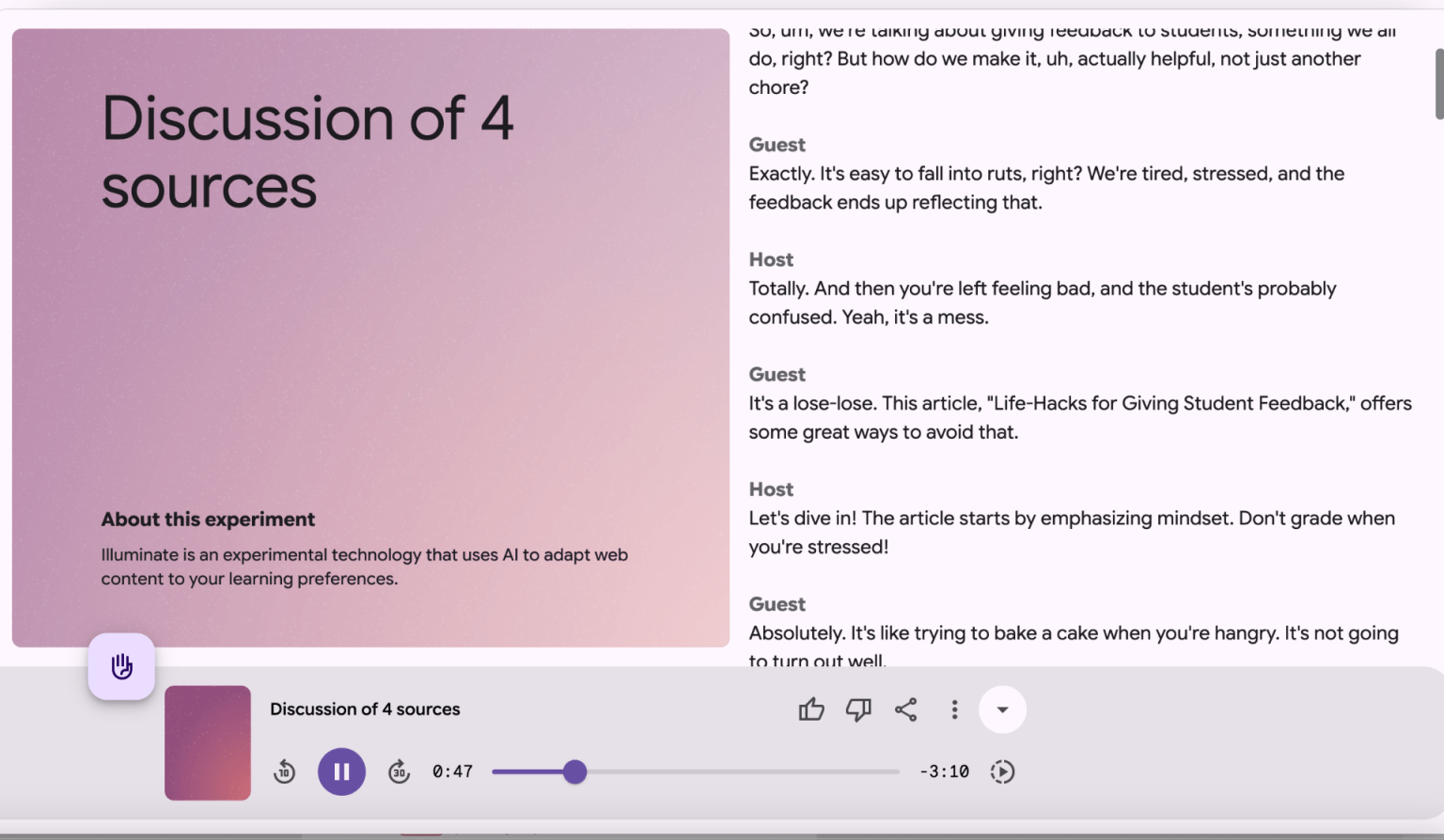
A 4-minute conversational podcast related to providing mid-semester feedback was generated that provides a decent overview of the topic is generated with a text transcript.

screenshot of the podcast interface

You might use this tool in your class to generate an overview to dense topics that students can listen to and/or read.

Resource to share with students:

GenAI Essentials: Practical AI Skills Across Disciplines (Student-Facing)

https://expand.iu.edu/browse/learningtech/courses/genai-essential-skills


This course, developed by the the Learning Technologies division of University Information Technology Services (UITS) covers:

  • Prompt Engineering – Crafting precise prompts to generate accurate and useful AI outputs.

  • Evaluating AI-Generated Content – Assessig reliability, credibility, and biases of AI-produced information.

  • Ethics and Limitations of GenAI – Understanding responsible AI use, ethical considerations, and potential risks.

  • Information Literacy in a GenAI Age – Applying verification strategies and library resources to fact-check AI-generated sources.

  • Studying and Learning with GenAI – Using AI tools for note-taking, summarization, and personalized learning support

Resource for you

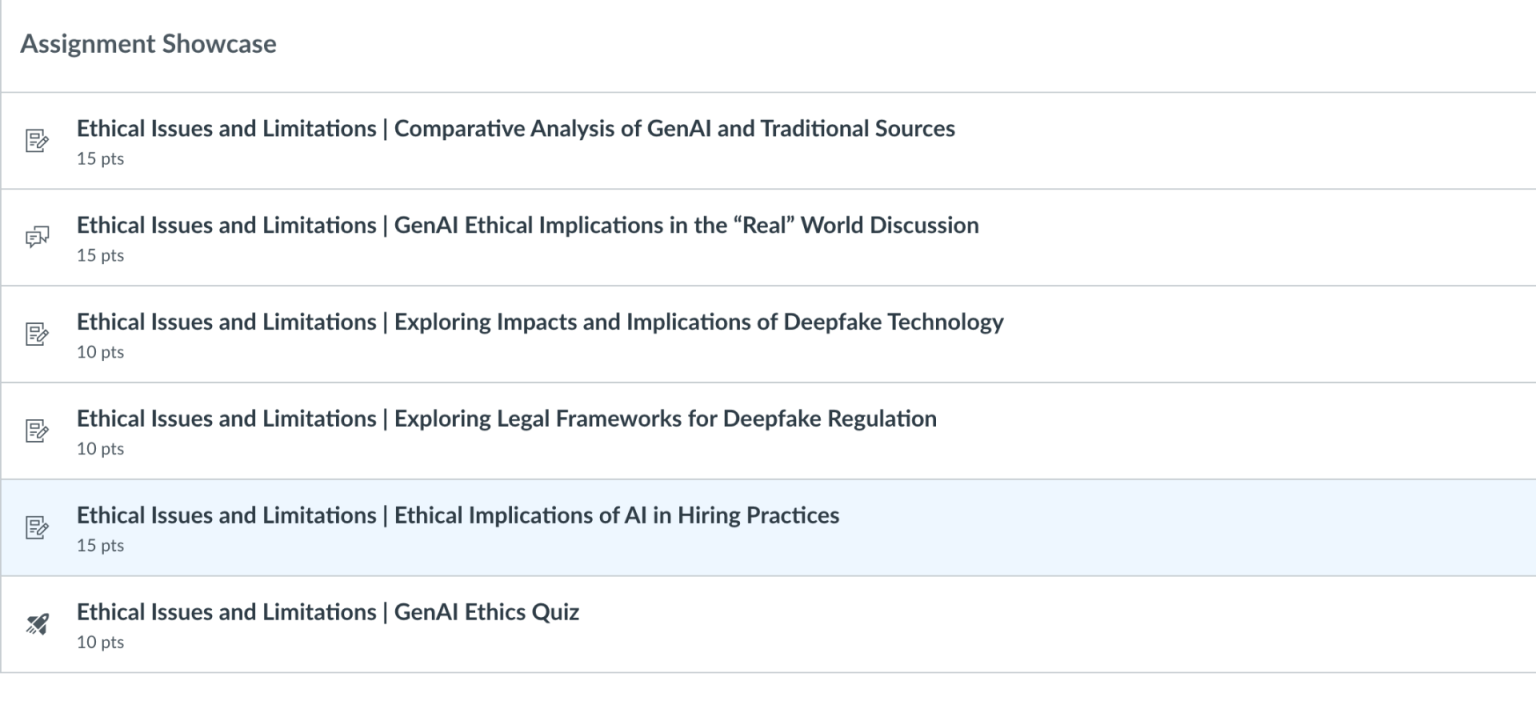
The faculty facing version of the course  https://iu.instructure.com/enroll/M7FE9Ecovers the same topics, but also includes assignment templates and rubrics that you can incorporate into your own course:

screenshot from the Canvas Gen AI Essentials at IU Course

Classroom Assessment Techniques

A new (2024) version of the classic book, “Classroom assessment techniques : formative feedback tools for college and university teachers” is available in the IU Library:

https://iucat.iu.edu/catalog/20750208

Classroom Assessment Techniques (CATs) are simple, low-pressure ways to check how well students are understanding the material. These methods are efficient, student-centered strategies that provide valuable insights into learning progress. Instructors can use feedback from CATs to adjust activities, offer extra support, or change the pace of the class to better meet student needs. CATs are not just about assessment—they also enhance learning. Here’s how:

  • Focus Students’ Attention: Students often come to class distracted by other concerns. Starting with a quick CAT activity can help them focus and prepare to engage.

  • Spot Trouble Early: A simple check-in at the beginning of class can reveal concepts that need more explanation or clarification, ensuring everyone is on the same page.

The book is a practical, research-based handbookthat helps faculty assess student learning at the classroom level. It offers tools for formative assessment applicable in face-to-face, hybrid, and online learning environments. While we have discussed the previous edition and related resources in the past, the new edition integrates 30 years of research and classroom practice, providing updated and field-tested assessment techniques. The book divides up CATs into several categories

Categories of Classroom Assessment Techniques (CATs) – Chapters 8-17 (adapted/edited with technical examples):

  1. Knowledge Recall & Understanding

Empty Outline

  • Students are given a partially completed algorithm design process outline and must fill in the missing steps.

  • Helps students recall fundamental software development methodologies (e.g., Waterfall, Agile, Scrum).

RSQC2 (Recall, Summarize, Question, Connect, Comment)

  • After a lesson on supervised vs. unsupervised learning, students:

    • Recall key definitions.

    • Summarize the differences.

    • Question a potential challenge in real-world applications.

    • Connect the concept to clustering methods in AI.

    • Comment on ethical concerns in algorithmic bias.

  1. Application

Concept Maps

  • Students create a concept map linking usability principles (e.g., learnability, efficiency, satisfaction) to a real-world user interface (such as a mobile banking app).

RSQC2

  • After discussing autonomous systems, students create a summary matrix evaluating:

    • Sensors used in self-driving cars

    • How decision-making algorithms function

    • Challenges in real-world implementation

  1. Problem Solving

What’s the Principle?

  • Given a dataset and an incorrectly applied machine learning model, students must identify the underlying principle that was violated (e.g., overfitting, lack of feature normalization).

Peer Debugging Sessions

  • Students review a piece of malfunctioning codeand collaboratively apply debugging strategies.

  • Helps them develop problem-solving approaches to software engineering.

  1. Critical Thinking & Analysis

Blooming (Using Bloom’s Taxonomy)

  • Students analyze real-world accessibility failuresin a user interface, progressing through Bloom’s levels:

    • Understanding accessibility guidelines.

    • Applying them to UI analysis.

    • Analyzing gaps in existing designs.

    • Evaluating how these impact user experience.

    • Creating a revised design proposal.

Comparing AI Bias in Decision-Making

  • Students critique different AI models used in hiring processes, identifying bias and ethics-related concerns.

  1. Synthesis & Creative Thinking

Student-Generated Questions

  • Students create quiz questions related to data structures and algorithms, peer-reviewing each other’s questions for complexity and clarity.

Concept Maps for IoT Networks

  • Students visually map out an Internet of Things (IoT) system, including:

    • Sensors

    • Cloud processing

    • Data security mechanisms

  1. Attitudes & Values

Profiles of Admirable Individuals

  • Students select a UX designer (e.g., Don Norman, Jakob Nielsen) and analyze how their design philosophy aligns with current industry best practices.

Reflective Journal on Bias in AI

  • Students keep a weekly reflection log on how AI-driven systems impact marginalized communities, promoting ethical awareness.

  1. Self-Assessment of Learning

Goal Ranking & Matching

  • Students list their learning objectives in a course on AI-driven robotics and compare them with the instructor’s objectives to identify gaps in understanding.

Debugging Logs for Self-Assessment

  • Students track their own debugging process, identifying mistakes and reflecting on how they could improve their approach in future coding projects.

  1. Learning & Study Skills

Learner Autobiography

  • Students write a brief reflection on:

    • How they approach learning programming languages.

    • Their experiences with learning statistics & machine learning.

    • How they plan to strengthen their weak areas.

  1. Perceptions of Learning Activities & Assessments

Reading & Video Ratings

  • After a video lecture on prototyping techniques, students rate its clarity and usefulness, providing feedback for future content improvements.

Prototype Peer Reviews

  • Students rate each other’s engineering prototypes based on innovation, feasibility, and efficiency, providing constructive feedback.

  1. Perceptions of Teaching & Courses

Teacher-Designed Feedback Forms

  • Students provide mid-semester feedback on:

    • Pacing of technical concepts.

    • Usefulness of coding assignments.

    • Need for more real-world applications in AI ethics case studies.

Agile Retrospectives for Course Reflection

  • Inspired by Agile methodologies, students participate in sprint retrospectives, reflecting on:

    • What went well

    • What could be improved

    • Next steps for refining their coding workflows