Liquid Syllabus


Liquid Syllabus (Pacansky-Brock, 2021, 2017, 2014; Pacansky-Brock et al., 2023, 2021) is a humanizing element that ensures students start a course feeling supported by their instructor. It intentionally provides students with what they need to succeed in week one of a course, including a warm, friendly face. It should be emailed to students the week prior to the start of a course. Rather than a PDF or a page locked inside a learning management system, it is a public, accessible, mobile-friendly website that opens instantly and renders beautifully on a phone. Pacansky-Brock recommends using Google Sites to create such a page: https://sites.google.com/iu.edu/start/home

Students are greeted with a brief, imperfect welcome video at the top; a learning pact that articulates what students can expect from their instructor and what will be expected of them; a list of week one due dates; and tips for success. It is written in a supportive tone and uses asset-based language to encourage growth, cultivate hope, establish expectations for success, and recognize the array of experiences and knowledge students bring to the class as a value that enriches learning. If policies are included, they are written in welcoming, hopeful language. 

The Components (from the Liquid Syllabus Course)

The Liquid Syllabus is intended to be emailed to your students the week before instruction begins. The Liquid Syllabus you design should be part of your overarching goal to ensure your students enter a learning environment that is safe, structured, and predictable. These characteristics support traumatized adult learners. While Pacansky-Brock’s Liquid Syllabus idea uses the idea of a website that students don’t have to log in to, you could:

  • Also embed the information onto a Page in Canvas,

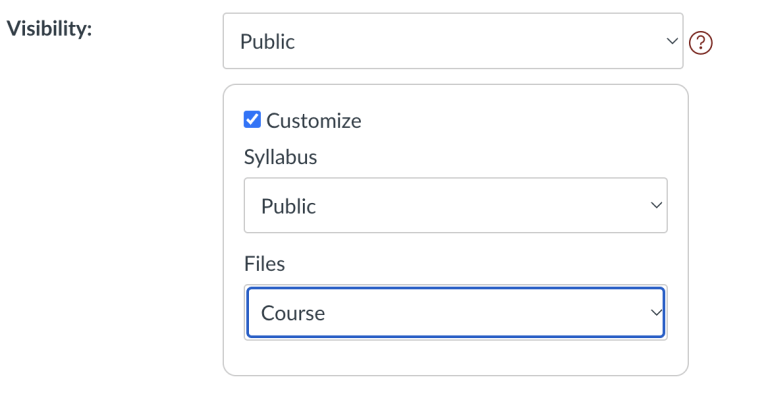
Screenshot from Canvas showing how to make your syllabus public.
  • If you are not ready to go all in on a Liquid Syllabus, consider reviewing this video that takes a new look at the Canvas Syllabus tool: 

What does your Liquid Syllabus say to your students?

Your Liquid Syllabus cues students that:

  1. You are a partner in their learning;

  2. Diversity is an asset in a learning environment;

  3. They are valued members of a learning community; 

  4. Success in the course is achievable to all students

What will your Liquid Syllabus include?  

A homepage that contains:

  1. A brief (2-3 minute) welcome video, hosted on YouTube.  The video breaks down the hierarchy between you and your students and cues students that there is a live, human on the other side of the screen who is there to support them.

    • While there are many workflows for hosting videos, Google Sites will only embed videos from YouTube. The video you embed will need to be shared on YouTube as Unlisted (only those with the link can view it) or Public (is retrievable in web searches and publicly visible on your YouTube channel).


  2. How This Course Works section that clearly communicates where and when (if applicable) students are expected to participate in your course. This section should clearly describe how the course is organized.


  3. My Teaching Philosophy section that is student-centered, includes supportive language and promotes confidence while engaging in rigor. Conveys high expectations while incorporating information about how you will support students to achieve academic success. 


  4. A Learning Pact that lists expectations that your students can expect from you and that you will expect from them. The pact cues students that you will play an active role in supporting their learning.


  5. How to Get Your Questions Answered section. This includes your instructor communication policy that clearly lets students know how they should contact you and what your response time is.


Additional pages that may include:

  1. Course Essentials (course description, outcomes, textbook, listed of other required materials.)


  2. Grading - A clear and transparent explanation about how grading works in your course. 


  3. Policies: This page includes your campus policies that are expected to be included in all course syllabi. Often, the language used in our institutional policies often informed by a deficit-based mindset about our students. Read your campus policies critically and ask yourself if they use deficient, intimidating, unwelcoming messages. If you identify these phrases, adapt them with equity-minded language. For example:

    • Instead of "Mandatory," begin with, "To be successful ..."

    • Instead of "You will be dropped from the course"..., begin with "I will check in on you if you forget to participate."

    • Instead of "Rigorous exceptions", begin with, “You really want to look out for X, and here’s a strategy so that it doesn’t happen.”

    • Instead of "Requirements," begin with, "Tips for success"

    • Instead of "No Excuses," begin with, "Search for solutions and keep an open line of communication with me"

    • Instead of "It is your responsibility to," begin with "Confusion is normal. Contact me if you have questions.


  4. ResourcesA list of institutional resources available for your students to support their academic success, and mental/physical well-being. This list includes links to each resource webpage so students can easily get more information.

Language Samples (from the Liquid Syllabus Course)

So what do we mean by "welcoming language"? Below are a few examples of common syllabus topics provided in a welcoming and an unwelcoming tone. Please take a few moments to consider these examples. Welcoming language includes contextual cues about why a particular policy or expectation is provided.  It also cues students that "taking a course" or "completing a course" is about learning and learning is a process of growth and development. 


Office Hours

Welcoming: I will hold an online office hour each week on Thursdays from 4-5pm. I welcome you to contact me outside of that time and will be happy to arrange a different meeting time in Zoom or via phone that accommodates both of our schedules.
Unwelcoming: I will hold one online office hour each week. Email me if you have questions but are unable to attend. We can find another time.  

Course Goals

Welcoming: Below is a list of specific skills this course is designed to guide you towards obtaining. Each assignment you complete in this course will contribute to your growth towards meeting these goals. After this class has ended, it is my hope that you will use these skills in your daily life.
Unwelcoming: Below is a list of specific skills you should obtain in this course. If you are motivated enough, you will use the skills in your daily life.

Participation

Welcoming:Participation involves logging in to our course, navigating through the content pages in a module, completing the readings and videos, participating in discussions and other activities, and submitting assignments/quizzes/exams. Your participation is not only an important part of your learning, it will also contribute to the learning of your peers. As members of our learning community, each of us has a responsibility to create an environment in which we can all learn from each other. 
Unwelcoming:Regular participation in this course is required. It is important to engage in our course content in order to do well in this course. 

To learn more about Liquid Syllabus, view this 3 minute video:


Teaching Tip: Updating Canvas for the Start of the Semester

This updated checklist intends to help your course meet the minimum expectations of Quality Matters and have proper settings and organized content. The Canvas Instructor Guide is a great resource if you have questions about using Canvas. As you prepare your course for the new semester, check off items on this list when you have confirmed they are complete.

Canvas Setup

  • Import from previous semesters - Make sure your course content has been successfully imported from previous semesters. (Instructor Guide: How do I copy content from another Canvas course?

  • Validate Links - Use the Validate Links tool to check all the links in a course at the same time. Links can get broken during the import process. You can find this tool under Settings in the left-hand navigation panel.

  • Combine sections of a course. - This feature allows you to move section enrollments from individual courses and combine them into one course. This feature is helpful for instructors who teach several sections of the same course and only want to manage course data in one location. (Instructor Guide: How do I combine sections of a Canvas course?)

  • Review dates. - Review the start and end dates for the course and ensure they accurately reflect the course term and include a short period of time after the end of the term for students to check final grades and assignment feedback. (Instructor Guide: How do I change the start and end datesfor a course?)

  • External tools - Check if all external tools (e.g., KalturaTopHatInScribe, etc.) are working properly, and make sure provide students the links to download the software.

  • Homepage - Set up or choose a home page to help your student get started. These homepage recommendations help your students familiarize themselves with your course and/or find the most recent announcements each time they enter your course. (Instructor Guide: How do I change the Course Home Page?)

  • Course card - Consider adding a course card to your page. A course card provides visual representation of the subject by adding an image in Course Settings. Canvas Guide - Add Image to Course Card

  • Syllabus - Set up your syllabus page by uploading your syllabus in Word/PDF format or edit the syllabus tab from the left navigation menu (Instructor Guide: How do I use the Syllabus as an instructor?) Having access to syllabi at least a week in advance would be extremely beneficial so that students can plan and organize their time for the semester ahead. The syllabus tool is a function in Canvas that allows students to see your syllabus and a list of assignments in the course in one easy to view location. You can see how it works on the Canvas Syllabus help guide (More on the syllabus will be provided next week).

  • Check for ADA accommodation requests - Do any of your students have accessibility accommodations this semester? It's important to make sure all your students are set for success. This can mean adding extra time to an exam for a student, ensuring your content is screen reader ready, or adding alternative text to images. https://community.canvaslms.com/t5/Accessibility/General-Accessibility-Design-Guidelines/ba-p/252642

  • Contact Information - Instructor has provided contact information which may include biography, availability information, communication preferences, response time, and picture. 

  • Navigation - Disable any features you and your students will not be using. For example, if you have decided not to use LinkedIN Learning, you should hide the link on the sidebar. (Instructor Guide: How do I manage Course Navigation links?)

Getting Started with Gradescope

Gradescope is an online grading platform that streamlines the grading process for assignments, quizzes, and exams. It offers features such as AI-assisted grading, rubric-based assessment, and detailed analytics, making it a valuable tool for both instructors and students.  Some of those features include:

  • Customized Rubrics: Instructors can create customized rubrics within Gradescope that outline specific grading criteria and expectations for assignments. By tailoring rubrics to align with learning objectives and student skill levels, instructors can provide more personalized feedback that addresses individual strengths and areas for improvement.

  • Individualized Feedback: Gradescope allows instructors to provide individualized feedback on student submissions. Instructors can leave comments directly on student work, offering personalized guidance, suggestions, and encouragement to support each student's learning journey.

  • Assignment Variations: Gradescope allows instructors to create multiple variations of certain assignment types, each with its own set of questions or parameters. This feature enables instructors to provide students with personalized assignments based on factors such as skill level, learning style, or individual interests.

  • Flexible Grading Options: Gradescope offers flexibility in grading options, allowing instructors to choose between manual grading, automated grading (using, or a combination of both. This flexibility enables instructors to adapt grading methods to suit the needs of different assignments, courses, and student populations.

  • Grade Adjustments: Instructors can easily adjust grades within Gradescope based on individual circumstances or extenuating factors. Whether accommodating accommodations for students with disabilities, considering exceptional circumstances, or recognizing exceptional effort, Gradescope allows instructors to personalize grading decisions while maintaining consistency and fairness.

  • Learning Analytics: Gradescope's analytics dashboard offers insights into student performance trends, allowing instructors to identify patterns, common misconceptions, and areas for improvement. This data-driven approach enables instructors to personalize grading strategies and instructional interventions to address specific learning needs.

  • Student Engagement Tracking: Gradescope allows instructors to track student engagement with assignments and assessments, including submission times and completion rates. By monitoring student activity, instructors can identify students who may need additional support or encouragement and tailor grading strategies accordingly.

Additional resources:

Quick Tip: Deliver Assignment Instructions as a low-stakes quiz

There are several ways that you can provide students with directions for an assignment:

  • Provide a write up in a handout or post in Canvas. 

  • Read parts of the directions to the class and ask if anyone has questions. 

  • Create a quick video explaining the assignment. 

As an alternative, you can use the Canvas quiz or quick check function to walk students through assignment expectations step-by-step. Students have to affirmatively answer questions - ranging from a simple “Yes, I understand” to choosing between options - about different components of the assignment.

A question about the components of a final programming assignment, for example, might ask them to think about how many different smaller assignments they’ll need to complete over the semester. While this adds a little extra step, it helps reinforce the importance of carefully reading assignment instructions. Additionally, once you’ve created the quiz once, you can re-use it for every assignment. 

Delivering the assignment instructions as a quiz walks students through assignment expectations step-by-step and makes students affirm that they have read the instructions. Every small thing we can do to encourage students to slow down and read instructions carefully is helpful.

Strategies to Help Struggling Students Turn It Around

The following tips were adapted from materials developed by Doug Holton, PhD. They are intended to help faculty support students at the midpoint of the semester who are struggling in class: