Midterm Feedback via Google Illuminate | GenAI Essentials | Upcoming Opportunities

It’s a great time to think about receiving midsemester feedback on your course. I have written about the topics in the past on my blog, however, this time I used a new resource that might be helpful for multiple purposes:

Google Illuminate is an AI tool that creates podcast-style audio summaries of research papers. It’s designed to make complex academic information more accessible and engaging.

How it works

  1. Input a research paper, PDF, orURL into Illuminate*, or search for a topic.

  2. Illuminate generates an audio summary that explains the key points of the document.

  3. You can ask questions about the document, and Illuminate will provide a text output.

  4. You can convert the text output into a podcast answer.

*I do NOT recommend inputting copywritten information into this tool. However, it is optimized for computer science topics, and supports research papers hosted on arXiv.org

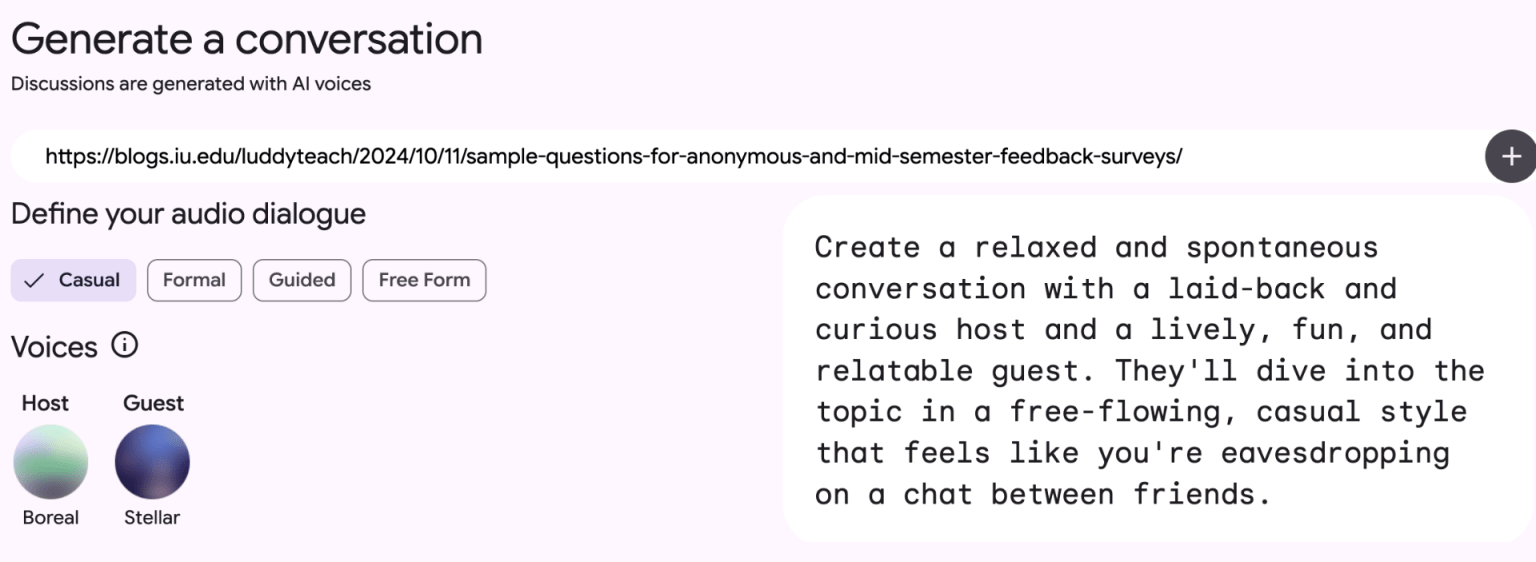
I used some of my previous blog posts to create a podcast that cover several aspects of creating developing and analyzing mid-semester feedback using the following prompt:

Create a relaxed and spontaneous conversation with a laid-back and curious host and a lively, fun, and relatable guest. They’ll dive into the topic in a free-flowing, casual style that feels like you’re eavesdropping on a chat between friends.

I used 4 resources from my blog:

Screenshot of what is now Google Notebook that shows a prompt for picking an audio for a podcast generated from my blog posts.

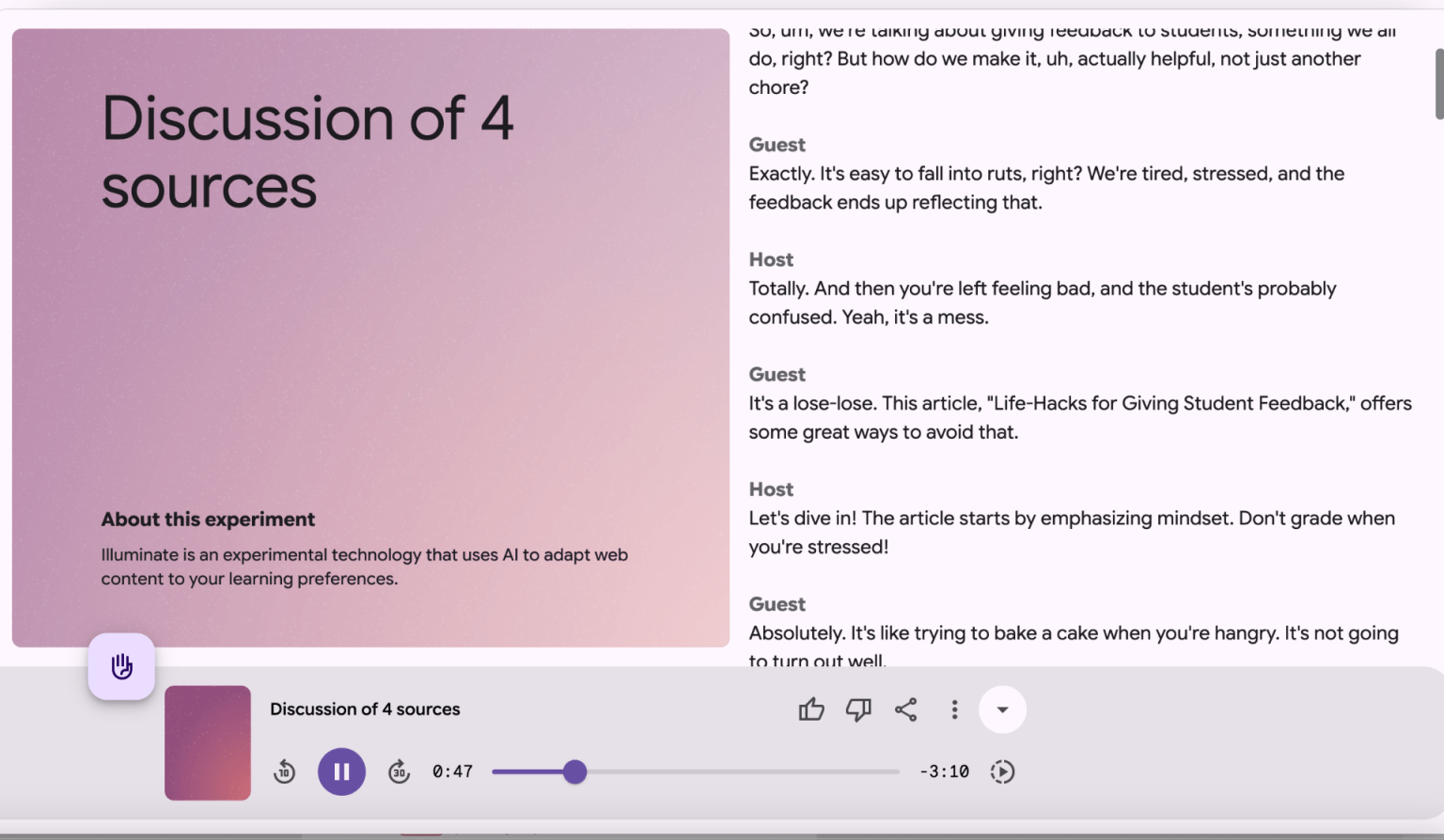
A 4-minute conversational podcast related to providing mid-semester feedback was generated that provides a decent overview of the topic is generated with a text transcript.

screenshot of the podcast interface

You might use this tool in your class to generate an overview to dense topics that students can listen to and/or read.

Resource to share with students:

GenAI Essentials: Practical AI Skills Across Disciplines (Student-Facing)

https://expand.iu.edu/browse/learningtech/courses/genai-essential-skills


This course, developed by the the Learning Technologies division of University Information Technology Services (UITS) covers:

  • Prompt Engineering – Crafting precise prompts to generate accurate and useful AI outputs.

  • Evaluating AI-Generated Content – Assessig reliability, credibility, and biases of AI-produced information.

  • Ethics and Limitations of GenAI – Understanding responsible AI use, ethical considerations, and potential risks.

  • Information Literacy in a GenAI Age – Applying verification strategies and library resources to fact-check AI-generated sources.

  • Studying and Learning with GenAI – Using AI tools for note-taking, summarization, and personalized learning support

Resource for you

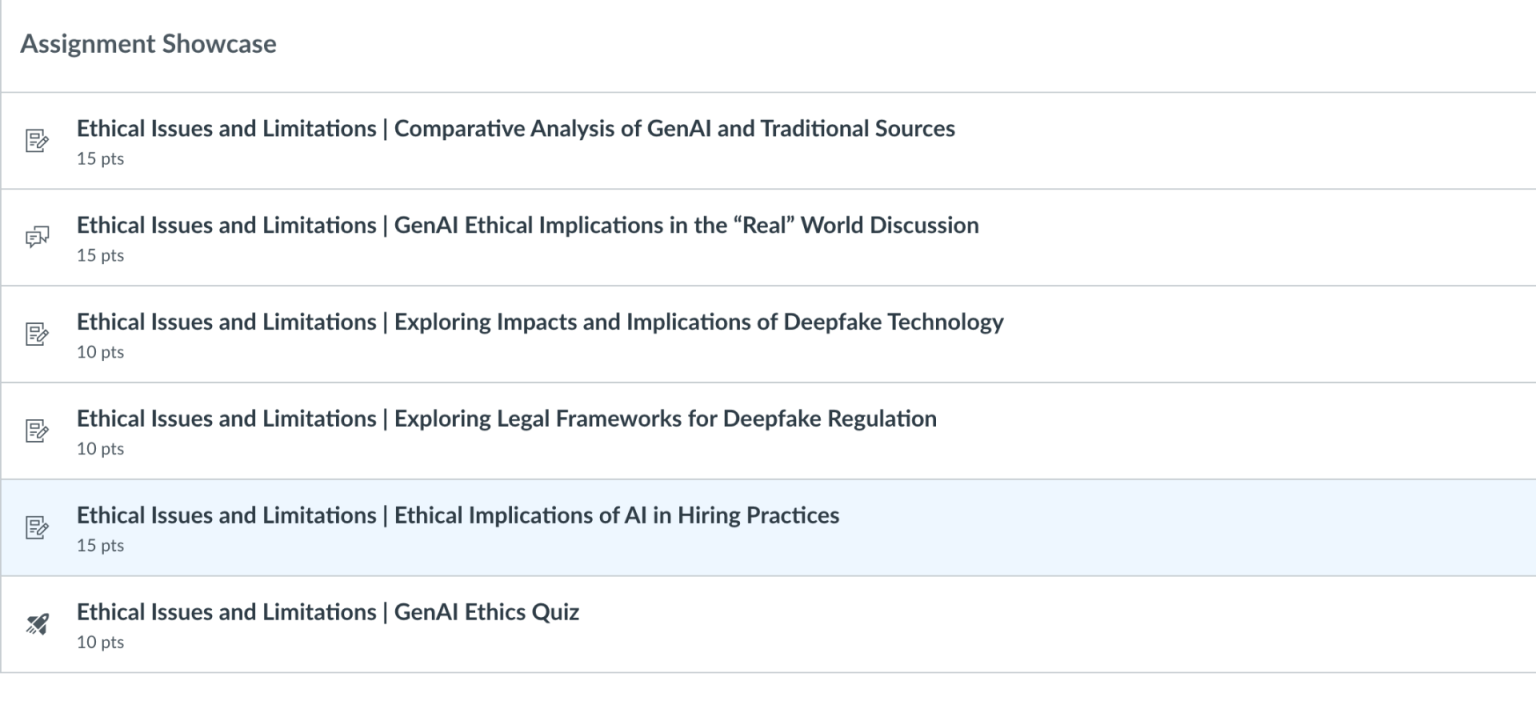
The faculty facing version of the course  https://iu.instructure.com/enroll/M7FE9Ecovers the same topics, but also includes assignment templates and rubrics that you can incorporate into your own course:

screenshot from the Canvas Gen AI Essentials at IU Course

Classroom Assessment Techniques

A new (2024) version of the classic book, “Classroom assessment techniques : formative feedback tools for college and university teachers” is available in the IU Library:

https://iucat.iu.edu/catalog/20750208

Classroom Assessment Techniques (CATs) are simple, low-pressure ways to check how well students are understanding the material. These methods are efficient, student-centered strategies that provide valuable insights into learning progress. Instructors can use feedback from CATs to adjust activities, offer extra support, or change the pace of the class to better meet student needs. CATs are not just about assessment—they also enhance learning. Here’s how:

  • Focus Students’ Attention: Students often come to class distracted by other concerns. Starting with a quick CAT activity can help them focus and prepare to engage.

  • Spot Trouble Early: A simple check-in at the beginning of class can reveal concepts that need more explanation or clarification, ensuring everyone is on the same page.

The book is a practical, research-based handbookthat helps faculty assess student learning at the classroom level. It offers tools for formative assessment applicable in face-to-face, hybrid, and online learning environments. While we have discussed the previous edition and related resources in the past, the new edition integrates 30 years of research and classroom practice, providing updated and field-tested assessment techniques. The book divides up CATs into several categories

Categories of Classroom Assessment Techniques (CATs) – Chapters 8-17 (adapted/edited with technical examples):

  1. Knowledge Recall & Understanding

Empty Outline

  • Students are given a partially completed algorithm design process outline and must fill in the missing steps.

  • Helps students recall fundamental software development methodologies (e.g., Waterfall, Agile, Scrum).

RSQC2 (Recall, Summarize, Question, Connect, Comment)

  • After a lesson on supervised vs. unsupervised learning, students:

    • Recall key definitions.

    • Summarize the differences.

    • Question a potential challenge in real-world applications.

    • Connect the concept to clustering methods in AI.

    • Comment on ethical concerns in algorithmic bias.

  1. Application

Concept Maps

  • Students create a concept map linking usability principles (e.g., learnability, efficiency, satisfaction) to a real-world user interface (such as a mobile banking app).

RSQC2

  • After discussing autonomous systems, students create a summary matrix evaluating:

    • Sensors used in self-driving cars

    • How decision-making algorithms function

    • Challenges in real-world implementation

  1. Problem Solving

What’s the Principle?

  • Given a dataset and an incorrectly applied machine learning model, students must identify the underlying principle that was violated (e.g., overfitting, lack of feature normalization).

Peer Debugging Sessions

  • Students review a piece of malfunctioning codeand collaboratively apply debugging strategies.

  • Helps them develop problem-solving approaches to software engineering.

  1. Critical Thinking & Analysis

Blooming (Using Bloom’s Taxonomy)

  • Students analyze real-world accessibility failuresin a user interface, progressing through Bloom’s levels:

    • Understanding accessibility guidelines.

    • Applying them to UI analysis.

    • Analyzing gaps in existing designs.

    • Evaluating how these impact user experience.

    • Creating a revised design proposal.

Comparing AI Bias in Decision-Making

  • Students critique different AI models used in hiring processes, identifying bias and ethics-related concerns.

  1. Synthesis & Creative Thinking

Student-Generated Questions

  • Students create quiz questions related to data structures and algorithms, peer-reviewing each other’s questions for complexity and clarity.

Concept Maps for IoT Networks

  • Students visually map out an Internet of Things (IoT) system, including:

    • Sensors

    • Cloud processing

    • Data security mechanisms

  1. Attitudes & Values

Profiles of Admirable Individuals

  • Students select a UX designer (e.g., Don Norman, Jakob Nielsen) and analyze how their design philosophy aligns with current industry best practices.

Reflective Journal on Bias in AI

  • Students keep a weekly reflection log on how AI-driven systems impact marginalized communities, promoting ethical awareness.

  1. Self-Assessment of Learning

Goal Ranking & Matching

  • Students list their learning objectives in a course on AI-driven robotics and compare them with the instructor’s objectives to identify gaps in understanding.

Debugging Logs for Self-Assessment

  • Students track their own debugging process, identifying mistakes and reflecting on how they could improve their approach in future coding projects.

  1. Learning & Study Skills

Learner Autobiography

  • Students write a brief reflection on:

    • How they approach learning programming languages.

    • Their experiences with learning statistics & machine learning.

    • How they plan to strengthen their weak areas.

  1. Perceptions of Learning Activities & Assessments

Reading & Video Ratings

  • After a video lecture on prototyping techniques, students rate its clarity and usefulness, providing feedback for future content improvements.

Prototype Peer Reviews

  • Students rate each other’s engineering prototypes based on innovation, feasibility, and efficiency, providing constructive feedback.

  1. Perceptions of Teaching & Courses

Teacher-Designed Feedback Forms

  • Students provide mid-semester feedback on:

    • Pacing of technical concepts.

    • Usefulness of coding assignments.

    • Need for more real-world applications in AI ethics case studies.

Agile Retrospectives for Course Reflection

  • Inspired by Agile methodologies, students participate in sprint retrospectives, reflecting on:

    • What went well

    • What could be improved

    • Next steps for refining their coding workflows

Instructor Talk

Studies by Seidel et al. (2015) and Harrison et al. (2019),  have demonstrated how Instructor Talk plays a crucial role in shaping classroom environments, influencing student engagement, learning attitudes, and potentially mitigating stereotype threats. Instructor talk is defined as any language used by an instructor that is not directly related to course content but instead shapes the learning environment.

Seidel et al. (2015) identified five major categories of non-content talk:

  1. Building the Instructor/Student Relationship– Encouraging respect, boosting self-efficacy, and offering advice for student success.

  2. Establishing Classroom Culture – Setting expectations, fostering a sense of community, and making students feel comfortable in the learning process.

  3. Explaining Pedagogical Choices – Justifying teaching methods to help students understand why certain approaches are used.

  4. Sharing Personal Experiences – Providing personal anecdotes or relating to student experiences.

  5. Unmasking Science – Discussing the nature of science and emphasizing diversity within the field.

Harrison et al. (2019) added a new category:“Negatively Phrased Instructor Talk.” This includes statements that may discourage students, undermine confidence, or convey unhelpful attitudes about learning.

Positively phrased Instructor Talk includes language that motivates, supports, and encourages students, helping to create an inclusive and productive learning environment.

Examples of Positively Phrased Instructor Talk:

Building the Instructor/Student Relationship (Encouraging and Inclusive Language)

  • “Debugging can be frustrating, but every programmer goes through it—even the best software engineers. You’re developing a valuable skill by troubleshooting.”

  • “There are many ways to solve this problem. If your approach works, it’s valid! Computer science is about creativity as much as logic.”

  • “If you’re stuck, that’s a good sign—you’re thinking critically! Take a step back, break the problem into smaller pieces, and try again.”

Establishing Classroom Culture (Fostering a Positive Learning Environment)

  • “In this class, collaboration is encouraged! Working with others will help you see different approaches and learn more effectively.”

  • “Asking questions is a sign of an engaged learner. Feel free to speak up—there are no bad questions in coding!”

  • “Mistakes are part of learning to program. The best way to improve is to experiment, test, and debug!”

Explaining Pedagogical Choices (Justifying Learning Strategies to Reduce Resistance)

  • “We use pair programming because research shows it helps students learn faster and develop teamwork skills.”

  • “I emphasize problem-solving over memorization because in real-world programming, you’ll be looking up syntax all the time—what matters is knowing how to think through problems.”

  • “This assignment is designed to help you build a strong foundation. Once you grasp these basics, you’ll be able to tackle much more complex projects.”

Sharing Personal Experiences (Relating to Students)

  • “When I first learned recursion, it completely confused me! But breaking it down into base cases and recursive steps helped me understand it.”

  • “I once spent an entire weekend debugging a program because of a missing semicolon. Now I always double-check my syntax!”

Unmasking Computer Science (Encouraging Diverse Perspectives & Scientific Thinking)

  • “There’s no single type of person who becomes a great programmer—some of the best developers come from all kinds of backgrounds.”

  • “Computer science isn’t just about writing code. It’s about solving problems and thinking critically—skills that are valuable in any field.”

Examples of Negatively Phrased Instructor Talk:

Building the Instructor/Student Relationship (Discouraging Students)

  • “This is just how programming works—either you get it, or you don’t.”

  • “If you’re struggling with loops, maybe computer science isn’t for you.”

  • “Some of you clearly didn’t put in the effort, and it shows in your code.”

Establishing Classroom Culture (Creating Anxiety or an Unwelcoming Environment)

  • “If you can’t get this assignment working, you’ll probably fail the course.”

  • “I’m not here to hold your hand—figure it out on your own.”

  • “Real programmers don’t need to ask for help. If you need help, you’re not thinking hard enough.”

Explaining Pedagogical Choices (Undermining Learning Strategies)

  • “I don’t really believe in these ‘new’ teaching methods, but the department requires me to use them.”

  • “Honestly, I don’t see the point of teaching theory—you’ll just learn everything on the job anyway.”

  • “You just need to memorize this syntax and move on. Understanding isn’t really necessary.”

Sharing Personal Experiences (Self-Effacing or Confusing Students)

  • “I never really understood object-oriented programming myself, but here’s the textbook definition.”

  • “Back in my day, we had to learn this without any online tutorials. You have it easy!”

Unmasking Computer Science (Excluding or Dismissing Certain Groups)

  • “Let’s be honest, some people just don’t have the logical thinking required for coding.”

  • “There aren’t many women in AI, but that’s just the way the field is.”

  • “If you’re not naturally good at math, you’re going to struggle a lot in this class.”

Findings revealed that Instructor Talk was present in every class session, ranging from six to 68 instances per class session. The study by Seidel et al. (2015) suggests that Instructor Talk can impact student motivation, reduce resistance to active learning, and help mitigate stereotype threat. The introduction of negatively phrased Instructor Talk suggests that some instructor behaviors may unintentionally harm student learning and should be carefully examined. The authors recommend that educators reflect on their non-content talk to enhance student engagement and learning outcomes. While Harrison et al. (2019)validated its applicability across multiple courses and identified new challenges related to negative instructor language. Both studies emphasize the importance of non-content communication in higher education, particularly in STEM courses.

Harrison, C. D., Nguyen, T. A., Seidel, S. B., Escobedo, A. M., Hartman, C., Lam, K., … & Tanner, K. D. (2019). Investigating instructor talk in novel contexts: Widespread use, unexpected categories, and an emergent sampling strategy. CBE—Life Sciences Education, 18(3), ar47. https://doi.org/10.1187/cbe.18-10-0215

Seidel, S. B., Reggi, A. L., Schinske, J. N., Burrus, L. W., & Tanner, K. D. (2015). Beyond the biology: A systematic investigation of noncontent instructor talk in an introductory biology course. CBE—Life Sciences Education, 14(4), ar43. https://doi.org/10.1187/cbe.15-03-0049
Quick Tip: Wise Feedback

The article “Breaking the Cycle of Mistrust: Wise Interventions to Provide Critical Feedback Across the Racial Divide,” by Yeager et al. https://www.apa.org/pubs/journals/releases/xge-a0033906.pdf , introduces the concept of wise feedback; a strategy that helps instructors frame feedback in a way that communicates that students can meet high expectations and gives concrete direction for how to meet the expectations. 

The research comprised three studies focusing on middle and high school students. In the first study, students were divided into two groups: one receiving “wise feedback” and the other serving as a control. For the wise feedback group, comments on their essay drafts were paired with a note that said, “I’m giving you these comments because I have very high expectations, and I know that you can reach them.” In contrast, the control group’s note read, “I’m giving you these comments so that you’ll have feedback on your paper.” Students who received wise feedback were more likely to act on the suggestions and produced higher-quality revisions. This approach was particularly impactful for students from diverse backgrounds.

Adapting this to programming, the following steps can help provide effective feedback (from UC Berkley’s Greater Good in Education Center https://ggie.berkeley.edu/practice/giving-wise-feedback):

  • When reviewing a developer’s code or project, include the following in your feedback:

    • Start with specific actionable feedback:

      • “Your implementation meets the basic functionality, but I’ve added comments suggesting optimizations for improving performance and readability.”

      • “While your API design fulfills the requirements, the comments I left highlight ways to make the endpoints more efficient and user-friendly.”

    • State high expectations:

      • “This project is a step toward building production-ready code, which requires adherence to best practices for maintainability and scalability.”

      • “Writing clean and modular code here will prepare you for working on large, collaborative codebases in professional settings.”

    • Express confidence in the programmer’s ability to succeed:

      • “Based on your previous work, I’m confident you’ll be able to implement the suggested changes effectively.”

      • “Your problem-solving skills from earlier tasks show that you have what it takes to refine this code to meet higher standards.”

  • Additional tips to consider when using wise feedback in programming:

    • Use this type of feedback for tasks that represent meaningful learning opportunities and require the developer’s best effort, such as debugging complex issues or designing scalable solutions.

    • Incorporate this practice into a broader culture of trust, where developers feel valued and supported by their peers and mentors.

    • Avoid overpraising incomplete or substandard work, as this can unintentionally reinforce the belief that their efforts are not being taken seriously or that expectations are low.

    • While this approach benefits all developers, it is particularly impactful for those new to the field, who may struggle with imposter syndrome or worry about being judged unfairly based on stereotypes or biases.

This research emphasizes the importance of trust in the student-teacher relationship. It demonstrates that wise feedback, by directly addressing and mitigating mistrust, can significantly improve academic outcomes for underrepresented students. The findings have broad implications for educational practice by suggesting that through the lens of social-psychological theory, the study underscores how early interventions can create lasting positive effects on trust, motivation, and performance. Furthermore, the Science of “Wise Interventions” explores how social-psychological approaches can address educational disparities, reinforcing the effectiveness of strategies likewise feedback in fostering positive student outcomes: https://studentexperiencenetwork.org/wp-content/uploads/2018/08/The-Science-of-Wise-Interventions.pdf 

Integrating metacognitive and student engagement strategies into your practice

The article, How Changes in K-12 Schooling Hampered the Preparation of College Students” Published last month in the Chronicle of Higher Education,  explores how reforms in K-12 education, combined with broader societal changes and disruptions from the COVID-19 pandemic, and teacher shortages have affected the academic habits and preparedness of today’s college students, particularly Generation Z. When examining how test-based accountability has impacted curriculum design, policies such as “No Child Left Behind” have prioritized short-term performance over long-term learning.

Teaching became narrowly focused on test-taking skills, such as answering multiple-choice questions and writing formulaic essays, leaving students unprepared for broader academic tasks. “The [K-12] curriculum has been narrowed to mirror standardized tests. Students work on short passages to develop specific skills. Every class has a lesson, and every lesson has an assessment plan and an outcome. So when students arrive at college, they are conditioned to expect that same level of guidance. Ethan Hutt [an associate professor of education at the University of North Carolina at Chapel Hill], would like to give an assignment that goes like this: Pick a topic, write an essay, and say something interesting. But he finds he can’t — not even with his doctoral students”.

The article argues that, as a result, Students struggle with tasks like reading long texts and writing analytical essays because of a curriculum that favored short passages and responses. The shift away from holistic learning resulted in “atomized” education, where students are conditioned to expect detailed rubrics and granular guidance for assignments. Professors find that students enter college unprepared for the skills that are expected of them. Students often struggle with open-ended assignments, critical thinking, and engaging deeply with academic material. The article concludes that while K-12 reforms and the pandemic have played significant roles in shaping current students’ academic habits, broader systemic and cultural factors must also be addressed. Higher education inherits these challenges and must adapt to better support students’ academic and social transitions.

Based on the content of this article it may be helpful to integrate student engagement and metacognitive practices into first and second year classes such as integrating the Student Engagement Roster into your classroom practice:

SER Roster: The early feedback tool that allows faculty members to communicate with students about how they are doing in a class and make recommendations to improve or deepen their learning. SER also allows instructors to meet two faculty reporting obligations at IUB: Attendance verification and early evaluation grades. More information on those topics is available in the Help and Resources section.

Next week (1/20/2025) Submit SER with Attendance/Participation Feedback for:

  • Anyone not attending

  • Anyone already struggling to turn in work

  • Anyone doing a great job participating

Metacognitive Strategies


Think Aloud Exercises:

Anytime you can talk out loud (‘think aloud’) about how you view a document or a picture or programming an assignment, or share your thinking processes with students you are helping them become more metacognitive in their own approaches to the subject.  Once you have modeled for them how you would solve a problem or interpret a piece of writing, have students work in pairs to talk out loud as to how they are thinking about an assignment piece of homework or an assignment.

Concept Mapping: 

Learning benefits can be derived from instructor-led or student-constructed concept maps of the connections and key ideas from a course or class. It is best that the instructor demonstrate how to design a concept map of a class or course before students are asked to do the same. Show students how the readings, videos, assignments and activities are connected to the course learning outcomes and other courses.

Design a brief or detailed concept map of the course or sub-components of the course and share with students. Then later on in course students can form small groups and build a concept map as a review activity before a mid-term or as a review of a portion of the course. Students can do for homework or they can do in class and share with each other explaining the interrelationships between each component. Ask the students to draw all the ‘cross-links’ and label them as they see the components connecting fully or partially.

Guided Notes

Guided notes are structured outlines provided by an instructor that include key concepts, ideas, or topics, with spaces for students to fill in additional information during the lecture or while engaging with course content.

  • Lecture Notes: An instructor provides an outline of the lecture with prompts for students to add definitions, examples, or connections.

  • Reading Notes: A guided framework for analyzing a reading or resource, directing students’ attention to specific questions or themes.

  • Problem-Solving Frameworks: In mathematics or sciences, guided notes might include partial steps of a problem-solving process, leaving students to complete the solution.

This technique aligns with various teaching strategies, including scaffolding and universal design for learning (UDL), as it helps to bridge the gap between independent learning and instructor support.

More strategies and resources available here.