Sample Questions for Anonymous and Mid-semester Feedback Surveys

We have discussed the importance of getting midsemester feedback from students. Mid-semester feedback lets instructors “check the pulse” of their class partway through the semester. By surveying students, especially after a chance to evaluate evidence of learning, instructors and students alike can gain practical and actionable insights about what is working as well as recommendations for improving learning and teaching.

In addition to the general questions provided in this blog post, you may want to ask your students more specific questions about your course goals, inclusive teaching practice, classroom dynamics, pacing, and content. Curating your own questions enables you to gather targeted student feedback and be responsive to that feedback through adjustments to the course to benefit students and their learning for the rest of the semester. The following questions were developed by Poorvu Center for Teaching and Learning and the University Center for Teaching and Learning.

General Questions (pre-populated in Canvas) 

  • What is helping your learning in this class?

  • What is hindering your learning in this class?

  • What could the instructor change to improve your learning experience in this class?

  • What could you do differently to improve your learning experience in this class?

Inclusive Teaching Questions 

  • Does the instructor make you feel that you belong in the class?  What suggestion do you have for promoting a greater sense of belonging?

  • How comfortable do you feel participating in the class? Is there anything that the instructor could do to encourage more equitable participation among all of the students?

  • What does the instructor do to foster mutual respect among students?  What else could the instructor do?

  • Does the instructor teach in a manner that supports students like you to succeed? In what ways?

  • How accessible is the instructor outside of class to support you in your learning?

  • Are you able to access all course materials?  Do you have any suggestions for making materials more accessible?

Course Materials & Goals Questions 

  • Does the instructor clearly communicate course expectations?  Do you have any suggestions for improvement?

  • To what extent are the course materials valuable? Which of the materials–used in class or assigned out of class–have been most useful and least useful to your learning?

  • How has the professor’s use of materials (readings, slides, multi-media such as podcasts or films, etc.) helped you understand the subject of this course? What changes might help you learn better?

  • Is the volume of course material appropriate? Student-Learning Focused Questions

  • What are the most significant things you have learned thus far from taking this course?

  • How does the instructor help you understand what are the most important points within class? Could they do anything differently?

  • Do you feel as though your performance in the class is a reflection of your understanding of course material?  Why or why not?

  • Do you have any suggestions to improve the quality of feedback that you are getting on your understanding of course material?

Examples of questions to solicit targeted feedback on specific or new aspects of the course:

  • Which (Class activity, assessment, course material, technology tool) has been most beneficial to your learning and why?

Classroom Dynamics & Pacing Questions 

  • How does your instructor engage your attention? Are there other approaches that would make you feel engaged in the class?

  • What types of opportunities do you have to interact with the instructor and the other students in the course?  How are these interactions supporting your learning and improving your experience in the course?

  • How is the pacing of this course for you?  Do you have any suggestions for improvement?

Likert Questions If you teach a large course, reviewing qualitative questions from many students may not yield clearly defined feedback. Instead, consider using Likert scale questions, which can’t be used in the midsemester feedback tool on Canvas but can be used in various other survey options. When viewing your results, consider looking at the median and mode responses and a histogram of all of the responses, as to not allow outliers to skew your interpretation.

Below are some questions that could mostly be answered on a 1 to 5 Likert scale with 5 being strongly agree and 1 being strongly disagree.

Inclusive Teaching Questions 

  • The instructor makes me feel that I belong in the class.

  • I am able to easily get answers to questions about course material.

  • The instructor fosters mutual respect among students.

  • The instructor of the class is accessible for questions or concerns.

  • The course materials are all accessible.

Course Materials & Goals Questions 

  • The instructor communicates course expectations clearly.

  • I find the course materials to be valuable.

  • The volume of course material is appropriate.

Student-Learning Focused Questions 

  • The instructor helps me understand what the most important points within class are.

  • I feel as though my course performance is an accurate reflection of my understanding of course material.

  • I am getting enough feedback on my understanding of course material.

Classroom Dynamics & Pacing Questions 

  • I am engaged during class.

  • The level of interaction in the course is supporting my learning.

  • The pace of the course is: 1- much too fast, 2- a little too fast, 3- just right, 4- a little too slow, 5- much too slow

Examples of questions to solicit targeted feedback on specific or new aspects of the course:

  • Would you prefer more or less (discussion? lecture? small group work? presentations?)

  • Which (Class activity, assessment, course material, technology tool) contributed to your learning?
Evidence Based Research Supporting the Use of PlayPosit in classes

PlayPosit https://app.teaching.iu.edu/tools/playposit is an interactive teaching tool/application used to make interactive videos, also known as bulbs. The application can be integrated into the Canvas using your own videos or by extracting videos from other sources, such as YouTube or TED Talks, and convert them into an interactive, topic- and student-focused mini-lessons by adding questions at appropriate time-points in the video. Educators may also prepare video clips from longer recorded lectures and encourage student engagement by providing context or additional information through text and images on slides, inserting questions to check for understanding, including discussion and reflection questions, giving pre-recorded feedback as they see fit, and even incorporating polling. PlayPosit videos pause at certain intervals chosen by the instructor to give students an opportunity to respond.

PlayPosit settings allow for multiple playback options, including allowing students to rewind, fast forward or retake the activities. The instructor may also incorporate instant feedback after each question; so, students not only see whether they answered correctly but also understand the rationale. This feedback enables instructors to modify instructional activities midstream in light of their effectiveness, impact, and value. Because formative evaluations are designed to guide the teaching process – and are not used as outcome indicators – they are generally individualized evaluations that are under the control of the instructor and target specific instructional topics, issues or concerns.

van der Meij, H., & Bӧckmann, L. (2021). Effects of embedded questions in recorded lectures. Journal of Computing in Higher Education, 33(1), 235–254. https://doi.org/10.1007/s12528-020-09263-x

  • Researchers sought to examine the effectiveness of providing “open-ended embedded questions” in recorded video lessons to better prepare students for upcoming in-class topics.

  • Student surveys, user logs, and knowledge tests showed that learners “engaged significantly more with the embedded questions lecture” and showed “significantly higher” average scores on those topics. Researchers concluded that embedded questions “can increase the effectiveness of online video-recorded

     lectures.”

Lewandowski, H.J., Pollard, B., West, C.G. (2020). Using custom interactive video prelab activities in a large introductory lab course. 2019 Physics Education Research Conference Proceedings. https://doi.org/10.1119/perc.2019.pr.Lewandowski

  • As part of a broader redesign of a large introductory physics course at the University of Colorado Boulder, researchers developed pre-lab videos with embedded PlayPosit questions to help students better prepare for in-person lab activities.

  • Researchers found that 90% of students completed the pre-lab video modules, with the “vast majority of students spending a nontrivial amount of time engaging with each question.” 80% of students felt the activities prepared them well for in-person lab tasks.

Sherifi, D., Jia, Y., Hunt, T. J., & Ndanga, M. (2023). Evaluation of a PlayPosit guided group project’s impact on student engagement in an undergraduate course. Discover Education, 2(1), 32. https://doi.org/10.1007/s44217-023-00057-8

  • Students appreciated that PlayPosit activities were enjoyable and different from other learning resources. Eleven students expressed that PlayPosits were “enjoyable, “short”, “quick”, “not overbearing”, “not drawn out or boring”, “made learning fun”, “a unique way of learning”, and “kept students interested”.

  • PlayPosit increased the teaching presence of the professor by virtue of having multiple touch points with the material focused on relevant tasks.

  • PlayPosit contributed to better interaction of the students with the course content, and as per their comments, was helpful and beneficial, as well as interesting and attractive. Furthermore, students were more attentive to the other course videos and recordings.

Karpicke, J.D. (2012). Retrieval-based learning: Active retrieval promotes meaningful learning. Current Directions in Psychological Science, 21(3), 157–163. https://doi.org/10.1177/0963721412443552

  • Researchers compared the effects of different study strategies on student learning between three test groups in the same course: one studying concepts by rereading materials with no recall activities, one mostly rereading with some recall activities, and one reading just once with more recall activities.

  • While surveyed students believed rereading would be the most effective study strategy, those who simply reread the same materials with no recall activities performed poorest on assessments. Those who practiced just one retrieval activity “doubled long-term retention,” and those who practiced multiple retrieval activities showed even larger gains

For more information on how to integrate PlayPosit into your course, please visit https://app.teaching.iu.edu/tools/playposit

Liquid Syllabus


Liquid Syllabus (Pacansky-Brock, 2021, 2017, 2014; Pacansky-Brock et al., 2023, 2021) is a humanizing element that ensures students start a course feeling supported by their instructor. It intentionally provides students with what they need to succeed in week one of a course, including a warm, friendly face. It should be emailed to students the week prior to the start of a course. Rather than a PDF or a page locked inside a learning management system, it is a public, accessible, mobile-friendly website that opens instantly and renders beautifully on a phone. Pacansky-Brock recommends using Google Sites to create such a page: https://sites.google.com/iu.edu/start/home

Students are greeted with a brief, imperfect welcome video at the top; a learning pact that articulates what students can expect from their instructor and what will be expected of them; a list of week one due dates; and tips for success. It is written in a supportive tone and uses asset-based language to encourage growth, cultivate hope, establish expectations for success, and recognize the array of experiences and knowledge students bring to the class as a value that enriches learning. If policies are included, they are written in welcoming, hopeful language. 

The Components (from the Liquid Syllabus Course)

The Liquid Syllabus is intended to be emailed to your students the week before instruction begins. The Liquid Syllabus you design should be part of your overarching goal to ensure your students enter a learning environment that is safe, structured, and predictable. These characteristics support traumatized adult learners. While Pacansky-Brock’s Liquid Syllabus idea uses the idea of a website that students don’t have to log in to, you could:

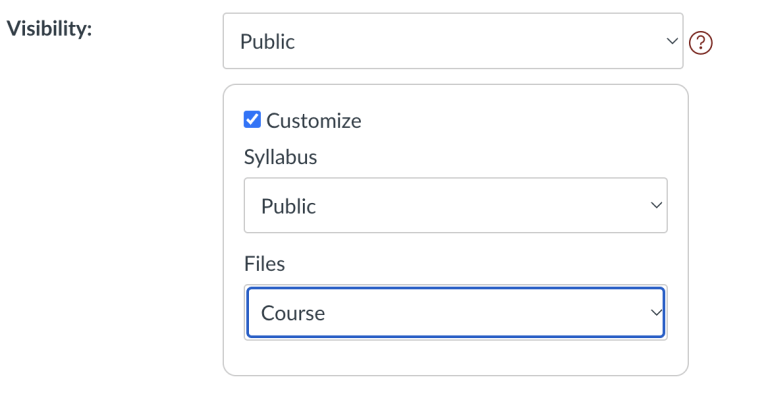
  • Also embed the information onto a Page in Canvas,

Screenshot from Canvas showing how to make your syllabus public.
  • If you are not ready to go all in on a Liquid Syllabus, consider reviewing this video that takes a new look at the Canvas Syllabus tool: 

What does your Liquid Syllabus say to your students?

Your Liquid Syllabus cues students that:

  1. You are a partner in their learning;

  2. Diversity is an asset in a learning environment;

  3. They are valued members of a learning community; 

  4. Success in the course is achievable to all students

What will your Liquid Syllabus include?  

A homepage that contains:

  1. A brief (2-3 minute) welcome video, hosted on YouTube.  The video breaks down the hierarchy between you and your students and cues students that there is a live, human on the other side of the screen who is there to support them.

    • While there are many workflows for hosting videos, Google Sites will only embed videos from YouTube. The video you embed will need to be shared on YouTube as Unlisted (only those with the link can view it) or Public (is retrievable in web searches and publicly visible on your YouTube channel).


  2. How This Course Works section that clearly communicates where and when (if applicable) students are expected to participate in your course. This section should clearly describe how the course is organized.


  3. My Teaching Philosophy section that is student-centered, includes supportive language and promotes confidence while engaging in rigor. Conveys high expectations while incorporating information about how you will support students to achieve academic success. 


  4. A Learning Pact that lists expectations that your students can expect from you and that you will expect from them. The pact cues students that you will play an active role in supporting their learning.


  5. How to Get Your Questions Answered section. This includes your instructor communication policy that clearly lets students know how they should contact you and what your response time is.


Additional pages that may include:

  1. Course Essentials (course description, outcomes, textbook, listed of other required materials.)


  2. Grading - A clear and transparent explanation about how grading works in your course. 


  3. Policies: This page includes your campus policies that are expected to be included in all course syllabi. Often, the language used in our institutional policies often informed by a deficit-based mindset about our students. Read your campus policies critically and ask yourself if they use deficient, intimidating, unwelcoming messages. If you identify these phrases, adapt them with equity-minded language. For example:

    • Instead of "Mandatory," begin with, "To be successful ..."

    • Instead of "You will be dropped from the course"..., begin with "I will check in on you if you forget to participate."

    • Instead of "Rigorous exceptions", begin with, “You really want to look out for X, and here’s a strategy so that it doesn’t happen.”

    • Instead of "Requirements," begin with, "Tips for success"

    • Instead of "No Excuses," begin with, "Search for solutions and keep an open line of communication with me"

    • Instead of "It is your responsibility to," begin with "Confusion is normal. Contact me if you have questions.


  4. ResourcesA list of institutional resources available for your students to support their academic success, and mental/physical well-being. This list includes links to each resource webpage so students can easily get more information.

Language Samples (from the Liquid Syllabus Course)

So what do we mean by "welcoming language"? Below are a few examples of common syllabus topics provided in a welcoming and an unwelcoming tone. Please take a few moments to consider these examples. Welcoming language includes contextual cues about why a particular policy or expectation is provided.  It also cues students that "taking a course" or "completing a course" is about learning and learning is a process of growth and development. 


Office Hours

Welcoming: I will hold an online office hour each week on Thursdays from 4-5pm. I welcome you to contact me outside of that time and will be happy to arrange a different meeting time in Zoom or via phone that accommodates both of our schedules.
Unwelcoming: I will hold one online office hour each week. Email me if you have questions but are unable to attend. We can find another time.  

Course Goals

Welcoming: Below is a list of specific skills this course is designed to guide you towards obtaining. Each assignment you complete in this course will contribute to your growth towards meeting these goals. After this class has ended, it is my hope that you will use these skills in your daily life.
Unwelcoming: Below is a list of specific skills you should obtain in this course. If you are motivated enough, you will use the skills in your daily life.

Participation

Welcoming:Participation involves logging in to our course, navigating through the content pages in a module, completing the readings and videos, participating in discussions and other activities, and submitting assignments/quizzes/exams. Your participation is not only an important part of your learning, it will also contribute to the learning of your peers. As members of our learning community, each of us has a responsibility to create an environment in which we can all learn from each other. 
Unwelcoming:Regular participation in this course is required. It is important to engage in our course content in order to do well in this course. 

To learn more about Liquid Syllabus, view this 3 minute video:


Teaching Tip: Updating Canvas for the Start of the Semester

This updated checklist intends to help your course meet the minimum expectations of Quality Matters and have proper settings and organized content. The Canvas Instructor Guide is a great resource if you have questions about using Canvas. As you prepare your course for the new semester, check off items on this list when you have confirmed they are complete.

Canvas Setup

  • Import from previous semesters - Make sure your course content has been successfully imported from previous semesters. (Instructor Guide: How do I copy content from another Canvas course?

  • Validate Links - Use the Validate Links tool to check all the links in a course at the same time. Links can get broken during the import process. You can find this tool under Settings in the left-hand navigation panel.

  • Combine sections of a course. - This feature allows you to move section enrollments from individual courses and combine them into one course. This feature is helpful for instructors who teach several sections of the same course and only want to manage course data in one location. (Instructor Guide: How do I combine sections of a Canvas course?)

  • Review dates. - Review the start and end dates for the course and ensure they accurately reflect the course term and include a short period of time after the end of the term for students to check final grades and assignment feedback. (Instructor Guide: How do I change the start and end datesfor a course?)

  • External tools - Check if all external tools (e.g., KalturaTopHatInScribe, etc.) are working properly, and make sure provide students the links to download the software.

  • Homepage - Set up or choose a home page to help your student get started. These homepage recommendations help your students familiarize themselves with your course and/or find the most recent announcements each time they enter your course. (Instructor Guide: How do I change the Course Home Page?)

  • Course card - Consider adding a course card to your page. A course card provides visual representation of the subject by adding an image in Course Settings. Canvas Guide - Add Image to Course Card

  • Syllabus - Set up your syllabus page by uploading your syllabus in Word/PDF format or edit the syllabus tab from the left navigation menu (Instructor Guide: How do I use the Syllabus as an instructor?) Having access to syllabi at least a week in advance would be extremely beneficial so that students can plan and organize their time for the semester ahead. The syllabus tool is a function in Canvas that allows students to see your syllabus and a list of assignments in the course in one easy to view location. You can see how it works on the Canvas Syllabus help guide (More on the syllabus will be provided next week).

  • Check for ADA accommodation requests - Do any of your students have accessibility accommodations this semester? It's important to make sure all your students are set for success. This can mean adding extra time to an exam for a student, ensuring your content is screen reader ready, or adding alternative text to images. https://community.canvaslms.com/t5/Accessibility/General-Accessibility-Design-Guidelines/ba-p/252642

  • Contact Information - Instructor has provided contact information which may include biography, availability information, communication preferences, response time, and picture. 

  • Navigation - Disable any features you and your students will not be using. For example, if you have decided not to use LinkedIN Learning, you should hide the link on the sidebar. (Instructor Guide: How do I manage Course Navigation links?)

Getting Started with Gradescope

Gradescope is an online grading platform that streamlines the grading process for assignments, quizzes, and exams. It offers features such as AI-assisted grading, rubric-based assessment, and detailed analytics, making it a valuable tool for both instructors and students.  Some of those features include:

  • Customized Rubrics: Instructors can create customized rubrics within Gradescope that outline specific grading criteria and expectations for assignments. By tailoring rubrics to align with learning objectives and student skill levels, instructors can provide more personalized feedback that addresses individual strengths and areas for improvement.

  • Individualized Feedback: Gradescope allows instructors to provide individualized feedback on student submissions. Instructors can leave comments directly on student work, offering personalized guidance, suggestions, and encouragement to support each student's learning journey.

  • Assignment Variations: Gradescope allows instructors to create multiple variations of certain assignment types, each with its own set of questions or parameters. This feature enables instructors to provide students with personalized assignments based on factors such as skill level, learning style, or individual interests.

  • Flexible Grading Options: Gradescope offers flexibility in grading options, allowing instructors to choose between manual grading, automated grading (using, or a combination of both. This flexibility enables instructors to adapt grading methods to suit the needs of different assignments, courses, and student populations.

  • Grade Adjustments: Instructors can easily adjust grades within Gradescope based on individual circumstances or extenuating factors. Whether accommodating accommodations for students with disabilities, considering exceptional circumstances, or recognizing exceptional effort, Gradescope allows instructors to personalize grading decisions while maintaining consistency and fairness.

  • Learning Analytics: Gradescope's analytics dashboard offers insights into student performance trends, allowing instructors to identify patterns, common misconceptions, and areas for improvement. This data-driven approach enables instructors to personalize grading strategies and instructional interventions to address specific learning needs.

  • Student Engagement Tracking: Gradescope allows instructors to track student engagement with assignments and assessments, including submission times and completion rates. By monitoring student activity, instructors can identify students who may need additional support or encouragement and tailor grading strategies accordingly.

Additional resources: